Form source (Pascal)
Form source (DFM)
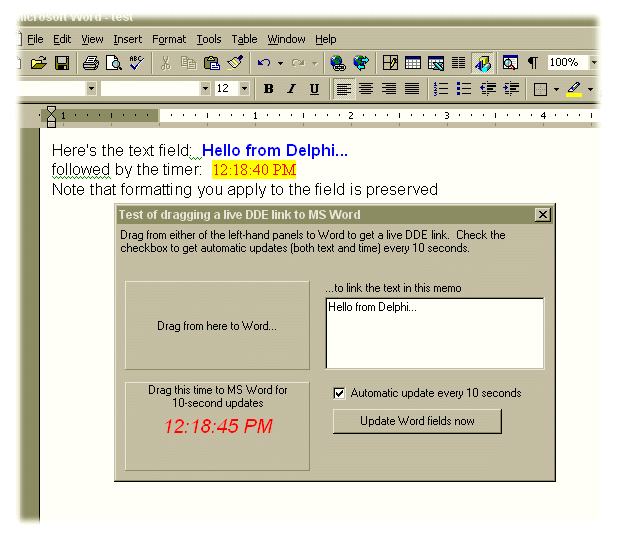
Project source
Form source (Pascal)
Form source (DFM)
| Project source: uoSource.dpr |
program uoSource;

{Test application for UnitOOPS OLE Drag and Drop Components.
 The name is intentionally kept short as DDE server application names
 appear to be limited to 8 characters.

 In fmDDELinkTest.pas, the DDE links are constructed so that you can rename
 this server to whatever you like, i.e., the name is not hard-coded.

 Last modified:  11/27/98}

uses
  Forms,
  fmDDELinkTest in 'fmDDELinkTest.pas' {Form1};

{$R *.RES}

begin
  Application.Initialize;
  Application.CreateForm(TForm1, Form1);
  Application.Run;
end.
Back to top
|
| Form source: fmDDELinkTest.pas |
unit fmDDELinkTest;

{ UnitOOPS OLE Drag and Drop Components - Example
  for dragging auto-updating DDE fields to MS Word.
  Works around problems with using the DDEAUTO field in NT4
  pre-SP4 versions by using the DDE field combined with OLE
  automation to update the field.

 Last modified:  11/27/98}

interface

uses
  Windows, Messages, SysUtils, Classes, Graphics, Controls, Forms, Dialogs,
  StdCtrls, uoole, DdeMan, ExtCtrls, ComCtrls;

type
  TForm1 = class(TForm)
    UOTextSource1: TUOTextSource;
    Panel1: TPanel;
    Button2: TButton;
    uoTestItem: TDdeServerItem;
    uoTestServer: TDdeServerConv;
    Panel2: TPanel;
    Label1: TLabel;
    Memo1: TMemo;
    Panel4: TPanel;
    Timer1: TTimer;
    uoTime: TDdeServerItem;
    Label2: TLabel;
    Label3: TLabel;
    CheckBox1: TCheckBox;
    procedure FormCreate(Sender: TObject);
    procedure Button2Click(Sender: TObject);
    procedure Panel1MouseDown(Sender: TObject; Button: TMouseButton;
      Shift: TShiftState; X, Y: Integer);
    procedure UOTextSource1BeforeDrop(Sender: TObject; Donor: TComponent;
      var dropText: String; var cancelDrop: Boolean);
    procedure Timer1Timer(Sender: TObject);
  private
    { Private declarations }

    procedure UpdateDDEItemText;
  public
    { Public declarations }
  end;

var
  Form1: TForm1;

{$R *.dfm}

implementation

uses
  ShellAPI, ComObj, ActiveX;

procedure TForm1.FormCreate(Sender: TObject);
begin
  Panel4.Caption := FormatDateTime(longTimeFormat, now);
  UpdateDDEItemText;
end;

procedure TForm1.UpdateDDEItemText;
// Update the DDE Server items.  Word has 2 different DDE macros:
// DDE, which inserts a non-updating field (you have to update the
// field by pressing F9 to pick up changes) or DDEAUTO which insearts
// an auto-updating field.  Due to some buggy behavior of Word in
// NT4/SP3 and earlier (but reportedly fixed in SP4), the auto-updating
// DDE connection breaks almost immediately, making it unacceptable for
// end-user deployment.  (The same works as designed in Excel, etc).
// Here, we work around this by a) inserting DDE rather than DDEAUTO
// fields (see, e.g., TForm1.Panel1MouseDown, below) and b) "pressing F9"
// (i.e., updating the Word document fields) using OLE automation.
var
  msword: variant;
  activeWindow: variant;
begin
  // Give each DDE Server item its new value.
  uoTestItem.Text := Memo1.Lines.Text;
  uoTime.Text := Panel4.Caption;

  // Now, update the fields in the MSWord document.  This is the simplest
  // possible implementation, and it only updates the fields in the active
  // document.

  // Any of the following calls could fail (e.g., Word not running, no
  // active window, etc), in which case an EOleSysError exception will be
  // thrown. Handle this error condition silently.
  try
    // Get the open MSWord instance, if any.
    msword := GetActiveOleObject('Word.Application');
    // Get the active window.
    activewindow := msword.Activewindow;
    // Update all fields in the document in the active window
    activeWindow.Document.Fields.Update;
  except
    // Silently handle OLE exceptions without showing them to the user
    on EOleSysError do;
  end;
end;

procedure TForm1.Button2Click(Sender: TObject);
begin
  // Update the Word fields now (don't wait for timer).
  UpdateDDEItemText;
end;

procedure TForm1.Panel1MouseDown(Sender: TObject; Button: TMouseButton;
  Shift: TShiftState; X, Y: Integer);
// Shared handler for the OnMouseDown event of both Panel1 and Panel4, each
// of which initiates a drag. Hint:  In applications where you're setting the
// TUOTextSource.Text property explicitly (i.e., where you don't have a
// DonorComponent), you typically only need one of them, since only a single
// drag can happen at a time.
var
  sItem: string;
begin
  // Start the drag
  if DragDetect((Sender as TWinControl).Handle, POINT(X, Y)) then
  begin
    // For Panel1, we drag the text.  For Panel4, we drag the time.
    if (Sender = Panel1) then
      sItem := uoTestItem.Name
    else
      sItem := uoTime.Name;

    with UOTextSource1 do
    begin
      // Clear the custom format data array
      CustomFormatData.Clear;

      // Add the custom format to allow dragging RTF.  We drag the RTF that
      // inserts a DDE field into Word.  NOT a DDEAUTO, since they don't work
      // right in NT prior to SP4 - just a DDE, and we'll update as necessary
      // later using OLE automation.
      CustomFormatData.AddFormat('Rich Text Format',
        Format('{\field{\*\fldinst { DDE %s %s %s \\* MERGEFORMAT }}}',
         [ChangeFileExt(ExtractFilename(Application.ExeName), ''), // DDE Server name
          uoTestServer.Name, // DDE Topic - same for both items on the form
          sItem // Item = name of item component
          ]));

      // If the drop is successful, we need to update the DDE item
      if Execute then
        UpdateDDEItemText;
    end;    // with
  end;
end;

procedure TForm1.UOTextSource1BeforeDrop(Sender: TObject;
  Donor: TComponent; var dropText: String; var cancelDrop: Boolean);
// The drop is about to happen.  Cancel if we're not over a MSWord
// document window.
const
  WordWindowClassName = '_WwG';  // window class for Word editing window
var
  aPt: TPoint;
  aHWnd: HWnd;
  S: string;
begin
  // See what's immediately under the mouse, and
  // if it's not Word, cancel the drop.
  GetCursorPos(aPt); // Where are we?
  aHWnd := WindowFromPoint(aPt); // What's underneath?
  SetLength(s, 255);
  GetClassName(aHWnd, PChar(s), 255); // Get its class name
  SetLength(s, StrLen(PChar(s)));

  // Cancel the drop if not Word
  cancelDrop := (AnsiCompareText(s, WordWindowClassName) <> 0);
end;

procedure TForm1.Timer1Timer(Sender: TObject);
// Handle a tick of the timer
var
  aDt: TDateTime;
  h, m, s, ms: word;
begin
  aDt := now;
  // Update the time caption every tick (1 second)
  Panel4.Caption := FormatDateTime(longTimeFormat, aDt);

  // Only update the live (Word) timers every 10 seconds
  DecodeTime(aDt, h, m, s, ms);
  if CheckBox1.Checked and ((s mod 10) = 0) then
    UpdateDDEItemText;
end;

initialization
  OleInitialize(nil);
finalization
  OleUninitialize;
end.
Back to top
|
| Form source: fmDDELinkTest.dfm |
object Form1: TForm1
  Left = 295
  Top = 246
  BorderStyle = bsDialog
  Caption = 'Test of dragging a live DDE link to MS Word'
  ClientHeight = 254
  ClientWidth = 436
  Font.Charset = DEFAULT_CHARSET
  Font.Color = clWindowText
  Font.Height = -11
  Font.Name = 'MS Sans Serif'
  Font.Style = []
  OnCreate = FormCreate
  PixelsPerInch = 96
  TextHeight = 13
  object Label3: TLabel
    Left = 208
    Top = 56
    Width = 136
    Height = 13
    Caption = '...to link the text in this memo'
  end
  object Panel1: TPanel
    Left = 8
    Top = 56
    Width = 185
    Height = 89
    BorderWidth = 10
    Caption = 'Drag from here to Word...'
    TabOrder = 0
    OnMouseDown = Panel1MouseDown
  end
  object Button2: TButton
    Left = 216
    Top = 184
    Width = 169
    Height = 25
    Caption = 'Update Word fields now'
    TabOrder = 1
    OnClick = Button2Click
  end
  object Panel2: TPanel
    Left = 0
    Top = 0
    Width = 436
    Height = 41
    Align = alTop
    BevelOuter = bvNone
    BorderWidth = 3
    Caption = 'Panel2'
    TabOrder = 2
    object Label1: TLabel
      Left = 3
      Top = 3
      Width = 430
      Height = 35
      Align = alClient
      Caption =
        'Drag from either of the left-hand panels to Word to get a live D' +
        'DE link.  Check the checkbox to get automatic updates (both text' +
        ' and time) every 10 seconds.'
      WordWrap = True
    end
  end
  object Memo1: TMemo
    Left = 208
    Top = 72
    Width = 220
    Height = 73
    Lines.Strings = (
      'testing 1, 2, 3...'
      'testing 1, 2, 3...')
    TabOrder = 3
  end
  object Panel4: TPanel
    Left = 8
    Top = 157
    Width = 185
    Height = 89
    Caption = 'time'
    Font.Charset = ANSI_CHARSET
    Font.Color = clRed
    Font.Height = -19
    Font.Name = 'Arial'
    Font.Style = [fsItalic]
    ParentFont = False
    TabOrder = 4
    OnMouseDown = Panel1MouseDown
    object Label2: TLabel
      Left = 1
      Top = 1
      Width = 183
      Height = 26
      Align = alTop
      Alignment = taCenter
      Caption = 'Drag this time to MS Word for 10-second updates'
      Font.Charset = ANSI_CHARSET
      Font.Color = clBlack
      Font.Height = -11
      Font.Name = 'MS Sans Serif'
      Font.Style = []
      ParentFont = False
      WordWrap = True
    end
  end
  object CheckBox1: TCheckBox
    Left = 216
    Top = 160
    Width = 201
    Height = 17
    Caption = 'Automatic update every 10 seconds'
    State = cbChecked
    TabOrder = 5
  end
  object UOTextSource1: TUOTextSource
    OnBeforeDrop = UOTextSource1BeforeDrop
    DropEffects = [deCopy]
    Left = 16
    Top = 32
  end
  object uoTestItem: TDdeServerItem
    ServerConv = uoTestServer
    Left = 192
    Top = 32
  end
  object uoTestServer: TDdeServerConv
    Left = 112
    Top = 32
  end
  object Timer1: TTimer
    OnTimer = Timer1Timer
    Left = 72
    Top = 32
  end
  object uoTime: TDdeServerItem
    ServerConv = uoTestServer
    Left = 152
    Top = 32
  end
end
Back to top
|