Form source (Pascal)
Form source (DFM)
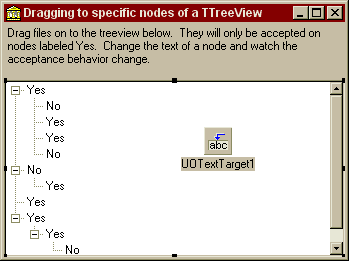
Project source
Form source (Pascal)
Form source (DFM)
| Project source: TreeViewTest.dpr |
program TreeViewTest;

{Example application for UnitOOPS OLE Drag and Drop Components}

uses
  Forms,
  fmTreeViewTest in 'fmTreeViewTest.pas' {Form1};

{$R *.RES}

begin
  Application.Initialize;
  Application.CreateForm(TForm1, Form1);
  Application.Run;
end.
Back to top
|
| Form source: fmTreeViewTest.pas |
unit fmTreeViewTest;

{ Main form for UnitOOPS OLE Drag and Drop Components test application.  Shows
  how to accept content only on specific nodes of a TTreeView.

  Last modified:  04/11/99}

interface

uses
  Windows, Messages, SysUtils, Classes, Graphics, Controls, Forms, Dialogs,
  uoole, ComCtrls, StdCtrls, ExtCtrls;

type
  TForm1 = class(TForm)
    TreeView1: TTreeView;
    UOTextTarget1: TUOTextTarget;
    Panel1: TPanel;
    Label1: TLabel;
    procedure UOTextTarget1DragOver(Sender: TObject; effect: TDropEffect;
      X, Y: Integer);
    procedure UOTextTarget1Drop(Sender: TObject; Acceptor: TWinControl;
      const dropText: String; X, Y: Integer);
  private
    { Private declarations }
  public
    { Public declarations }
  end;

var
  Form1: TForm1;

implementation

{$R *.DFM}

procedure TForm1.UOTextTarget1DragOver(Sender: TObject;
  effect: TDropEffect; X, Y: Integer);
// Dragging over the tree view.  Enable or disable drop.
var
  aTn: TTreeNode;
begin
  aTn := TreeView1.GetNodeAt(X, Y);
  // If we're over a node, and its caption is 'Yes', accept files
  // You'd substitute your own acceptance criterion for aTn here
  if assigned(aTn) and (aTn.Text = 'Yes') then
    UOTextTarget1.AcceptTextFormats := [dtfFiles]
  else
    // Otherwise, accept nothing
    UOTextTarget1.AcceptTextFormats := [];
end;


procedure TForm1.UOTextTarget1Drop(Sender: TObject; Acceptor: TWinControl;
  const dropText: String; X, Y: Integer);
begin
  MessageDlg('Accepting files:'#13#10+UOTextTarget1.DroppedLines.Text,
    mtInformation, [mbOK], 0);
end;

end.
Back to top
|
| Form source: fmTreeViewTest.dfm |
object Form1: TForm1
  Left = 202
  Top = 138
  Width = 349
  Height = 261
  Caption = 'Dragging to specific nodes of a TTreeView'
  Font.Charset = DEFAULT_CHARSET
  Font.Color = clWindowText
  Font.Height = -11
  Font.Name = 'MS Sans Serif'
  Font.Style = []
  PixelsPerInch = 96
  TextHeight = 13
  object TreeView1: TTreeView
    Left = 0
    Top = 57
    Width = 341
    Height = 177
    Indent = 19
    Items.Data = {
      040000001C0000000000000000000000FFFFFFFFFFFFFFFF0000000004000000
      035965731B0000000000000000000000FFFFFFFFFFFFFFFF0000000000000000
      024E6F1C0000000000000000000000FFFFFFFFFFFFFFFF000000000000000003
      5965731C0000000000000000000000FFFFFFFFFFFFFFFF000000000000000003
      5965731B0000000000000000000000FFFFFFFFFFFFFFFF000000000000000002
      4E6F1B0000000000000000000000FFFFFFFFFFFFFFFF0000000001000000024E
      6F1C0000000000000000000000FFFFFFFFFFFFFFFF0000000000000000035965
      731C0000000000000000000000FFFFFFFFFFFFFFFF0000000000000000035965
      731C0000000000000000000000FFFFFFFFFFFFFFFF0000000001000000035965
      731C0000000000000000000000FFFFFFFFFFFFFFFF0000000001000000035965
      731B0000000000000000000000FFFFFFFFFFFFFFFF0000000000000000024E6F}
    Align = alClient
    TabOrder = 0
  end
  object Panel1: TPanel
    Left = 0
    Top = 0
    Width = 341
    Height = 57
    Align = alTop
    BevelOuter = bvNone
    BorderWidth = 3
    TabOrder = 1
    object Label1: TLabel
      Left = 3
      Top = 3
      Width = 335
      Height = 51
      Align = alClient
      Caption =
        'Drag files on to the treeview below.  They will only be accepted' +
        ' on nodes labeled Yes.  Change the text of a node and watch the ' +
        'acceptance behavior change.'
      WordWrap = True
    end
  end
  object UOTextTarget1: TUOTextTarget
    AcceptorControl = TreeView1
    AcceptTextFormats = [dtfFiles]
    OnDragOver = UOTextTarget1DragOver
    OnDrop = UOTextTarget1Drop
    Left = 200
    Top = 104
  end
end
Back to top
|