Form source (Pascal)
Form source (DFM)
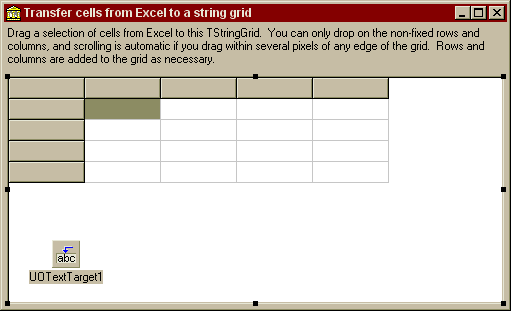
Project source
Form source (Pascal)
Form source (DFM)
| Project source: StringGridTest.dpr |
program StringGridTest;
{Main program file for test application for UnitOOPS OLE Drag and Drop Components.}
uses
  Forms,
  fmStringGrid in 'fmStringGrid.pas' {Form1};

{$R *.RES}

begin
  Application.Initialize;
  Application.CreateForm(TForm1, Form1);
  Application.Run;
end.
Back to top
|
| Form source: fmStringGrid.pas |
unit fmStringGrid;
{ UnitOOPS OLE Drag and Drop Components - Example
 Form for TStringList demo, showing how you can drag material from Excel.

 Last modified:  09/15/98}
interface

uses
  Windows, Messages, SysUtils, Classes, Graphics, Controls, Forms, Dialogs,
  uoole, uoUtil, Grids, StdCtrls, ExtCtrls;

type
  TForm1 = class(TForm)
    Panel1: TPanel;
    Label1: TLabel;
    Panel2: TPanel;
    StringGrid1: TStringGrid;
    UOTextTarget1: TUOTextTarget;
    procedure UOTextTarget1Drop(Sender: TObject; Acceptor: TWinControl;
      const dropText: String; X, Y: Integer);
    procedure UOTextTarget1DragOver(Sender: TObject; effect: TDropEffect;
      X, Y: Integer);
  private
    { Private declarations }
    procedure ScrollStringGrid(aPt: TPoint; aCol, aRow: integer);
  public
    { Public declarations }
  end;

var
  Form1: TForm1;

implementation


{$R *.DFM}


procedure TForm1.UOTextTarget1Drop(Sender: TObject; Acceptor: TWinControl;
  const dropText: String; X, Y: Integer);
// Put the dropped text in the string grid.
// Makes extra rows and columns as necessary.
var
  aCol, aRow: integer;
  j, k: integer;
  aSL: TStringList;
begin
  with StringGrid1 do
  begin
    // What cell did we drop over?
    MouseToCell(X, Y, aCol, aRow);

    // Now, let's interpret the dropped text as tab-delimited columns
    // in CR/LF-delimited rows.  Use the standard DroppedLines list
    // for this purpose.  By this point, the component has already done
    // all of the work for us, giving us the text in both dropText and
    // DroppedLines.
    with (Sender as TUOTextTarget).DroppedLines do
    begin
      for j := 1 to Count do    // Iterate over rows
      begin
        // Make an extra row if necessary
        if (aRow+j > RowCount) then
        begin
          RowCount := aRow+j;
          Refresh;
        end;

       // Parse the row into a temporary stringlist based on tabs
        aSL := uoTokenize(Strings[j-1], [#9]);
        try
          for k := 1 to aSL.Count do    // Iterate
          begin
            // Make an extra column if necessary
            if (aCol+k > ColCount) then
            begin
              ColCount := aCol+k;
              Refresh;
            end;

            // Fill the cell
            Cells[aCol+k-1, aRow+j-1] := aSL[k-1];
          end;    // for
        finally
          aSL.Free;
        end;
      end;    // for
    end;

    // Set the selection to the cell where the drop happened
    Row := aRow;
    Col := aCol;
  end;    // with
end;

procedure TForm1.ScrollStringGrid(aPt: TPoint; aCol, aRow: integer);
// Scroll the string grid based either on fixed row and column location, or
// on proximity to the edges.
const
  delta = 5;
type
  TScrollDir = (sdNone, sdLeft, sdRight, sdUp, sdDown);
var
  wRect, aRect: TRect;
  aSd: TScrollDir;
begin
  // Get the client rect for the grid
  Windows.GetClientRect(StringGrid1.Handle, wRect);

  aSd := sdNone; // Default is no scrolling

  // Are we scrolling left?
  aRect := Rect(0, 0, delta, wRect.Bottom);
  if PtInRect(aRect, aPt) or ((aCol >= 0) and (aCol < StringGrid1.FixedCols)) then
    aSd := sdLeft;
  // Right?
  aRect := Rect(wRect.Right-delta, 0, wRect.Right, wRect.Bottom);
  if PtInRect(aRect, aPt) then
    aSd := sdRight;
  // Up?
  aRect := Rect(0, 0, wRect.Right, delta);
  if PtInRect(aRect, aPt) or ((aRow >= 0) and (aRow < StringGrid1.FixedRows)) then
    aSd := sdUp;
  // Down?
  aRect := Rect(0, wRect.Bottom-delta, wRect.Right, wRect.Bottom);
  if PtInRect(aRect, aPt) then
    aSd := sdDown;

  with StringGrid1 do
  begin
    case aSd of    //
      sdLeft:  if (LeftCol > FixedCols) then
                 LeftCol := LeftCol-1;
      sdRight: if (LefTCol < ColCount-VisibleColCount) then
                 LeftCol := LeftCol+1;
      sdUp:    if (TopRow > FixedRows) then
                 TopRow := TopRow-1;
      sdDown:  if (TopRow < RowCount-VisibleRowCount) then
                 TopRow := TopRow+1;
    end;    // case
  end;

end;

procedure TForm1.UOTextTarget1DragOver(Sender: TObject;
  effect: TDropEffect; X, Y: Integer);
// The user is dragging over our string grid.
// Don't allow drops on the fixed rows or columns
var
  aRow, aCol: integer;
  aPt: TPoint;
begin
  with StringGrid1, (Sender as TUOTextTarget) do
  begin
    // What cell are we over?
    MouseToCell(X, Y, aCol, aRow);

    // Accept only if we're not in the fixed range
    AcceptText := ((aCol >= FixedCols) and
                   (aRow >= FixedRows));

    // The current point in string grid client coordinates
    aPt := Point(x, y);

    // Handle scrolling of the grid
    ScrollStringGrid(aPt, aCol, aRow);

    // Give feedback by selecting that cell
    if (aRow >= FixedRows) then
      Row := aRow;
    if (aCol >= FixedCols) then
      Col := aCol;

  end;
end;

end.
Back to top
|
| Form source: fmStringGrid.dfm |
object Form1: TForm1
  Left = 176
  Top = 240
  Width = 511
  Height = 311
  Caption = 'Transfer cells from Excel to a string grid'
  Font.Charset = DEFAULT_CHARSET
  Font.Color = clWindowText
  Font.Height = -11
  Font.Name = 'MS Sans Serif'
  Font.Style = []
  PixelsPerInch = 96
  TextHeight = 13
  object Panel1: TPanel
    Left = 0
    Top = 0
    Width = 503
    Height = 50
    Align = alTop
    BevelOuter = bvNone
    BorderWidth = 3
    TabOrder = 0
    object Label1: TLabel
      Left = 3
      Top = 3
      Width = 497
      Height = 44
      Align = alClient
      Caption =
        'Drag a selection of cells from Excel to this TStringGrid.  You c' +
        'an only drop on the non-fixed rows and columns, and scrolling is' +
        ' automatic if you drag within several pixels of any edge of the ' +
        'grid.  Rows and columns are added to the grid as necessary.'
      WordWrap = True
    end
  end
  object Panel2: TPanel
    Left = 0
    Top = 50
    Width = 503
    Height = 234
    Align = alClient
    BevelOuter = bvNone
    BorderWidth = 3
    Caption = 'Panel2'
    TabOrder = 1
    object StringGrid1: TStringGrid
      Left = 3
      Top = 3
      Width = 497
      Height = 228
      Align = alClient
      DefaultColWidth = 75
      DefaultRowHeight = 20
      TabOrder = 0
      RowHeights = (
        20
        20
        20
        20
        20)
    end
  end
  object UOTextTarget1: TUOTextTarget
    AcceptorControl = StringGrid1
    AcceptTextFormats = [dtfText]
    OnDragOver = UOTextTarget1DragOver
    OnDrop = UOTextTarget1Drop
    Left = 48
    Top = 217
  end
end
Back to top
|