Form source (Pascal)
Form source (DFM)
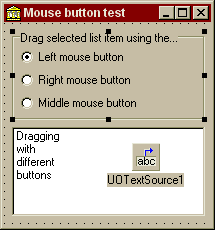
Project source
Form source (Pascal)
Form source (DFM)
| Project source: MouseButtonTest.dpr |
program MouseButtonTest;

uses
  Forms,
  fmMouseButtonTest in 'fmMouseButtonTest.pas' {Form1};

{$R *.RES}

begin
  Application.Initialize;
  Application.CreateForm(TForm1, Form1);
  Application.Run;
end.
Back to top
|
| Form source: fmMouseButtonTest.pas |
unit fmMouseButtonTest;

{ Example application for the UnitOOPS OLE Drag and Drop Components.
  Demonstrates the use of different mouse buttons to do the drag and drop.
  Requires the features of V1.33 or later of the components.

  Last modified:  05/13/99}
interface

uses
  Windows, Messages, SysUtils, Classes, Graphics, Controls, Forms, Dialogs,
  StdCtrls, uoole, ExtCtrls, Menus;

type
  TForm1 = class(TForm)
    ListBox1: TListBox;
    UOTextSource1: TUOTextSource;
    RadioGroup1: TRadioGroup;
    procedure ListBox1MouseDown(Sender: TObject; Button: TMouseButton;
      Shift: TShiftState; X, Y: Integer);
    procedure FormCreate(Sender: TObject);
    procedure RadioGroup1Click(Sender: TObject);
  private
    { Private declarations }
  public
    { Public declarations }
  end;

var
  Form1: TForm1;

implementation

uses
  uoUtil; // Make utility functions, including uoDragDetect, available

{$R *.DFM}

procedure TForm1.ListBox1MouseDown(Sender: TObject; Button: TMouseButton;
  Shift: TShiftState; X, Y: Integer);
// Mouse down.  Test for drag, regardless of the button.
var
  anItem: Integer;
begin
  // If middle or left button is down, select the item.
  if (Button in [mbRight, mbMiddle]) then
  begin
    anItem := ListBox1.ItemAtPos(POINT(X,Y), true);
    if (anItem >= 0) then
      ListBox1.ItemIndex := anItem;
  end;

  // Now, detect a drag.  Since the donor component is ListBox1, we just get
  // its selected item.  To drag anything else, we can use UOTextSource1.Text
  // or UOTextSource1.CustomFormatData.
  if uoDragDetect(ListBox1.Handle, POINT(X,Y), UOTextSource1.MouseButton) then
  begin
    UOTextSource1.Execute;
  end;
end;

procedure TForm1.FormCreate(Sender: TObject);
// Init.  Select the first list item, and match the radio group with the saved
// mouse button for the UOTextSource.
begin
  ListBox1.ItemIndex := 0;
  RadioGroup1.ItemIndex := Integer(UOTextSource1.MouseButton);
end;

procedure TForm1.RadioGroup1Click(Sender: TObject);
begin
  UOTextSource1.MouseButton := TMouseButton(RadioGroup1.ItemIndex);
end;

end.
Back to top
|
| Form source: fmMouseButtonTest.dfm |
object Form1: TForm1
  Left = 479
  Top = 298
  Width = 215
  Height = 230
  Caption = 'Mouse button test'
  Font.Charset = DEFAULT_CHARSET
  Font.Color = clWindowText
  Font.Height = -11
  Font.Name = 'MS Sans Serif'
  Font.Style = []
  OnCreate = FormCreate
  PixelsPerInch = 96
  TextHeight = 13
  object ListBox1: TListBox
    Left = 8
    Top = 104
    Width = 193
    Height = 89
    ItemHeight = 13
    Items.Strings = (
      'Dragging'
      'with'
      'different'
      'buttons')
    TabOrder = 0
    OnMouseDown = ListBox1MouseDown
  end
  object RadioGroup1: TRadioGroup
    Left = 8
    Top = 8
    Width = 193
    Height = 89
    Caption = 'Drag selected list item using the...'
    ItemIndex = 0
    Items.Strings = (
      'Left mouse button'
      'Right mouse button'
      'Middle mouse button')
    TabOrder = 1
    OnClick = RadioGroup1Click
  end
  object UOTextSource1: TUOTextSource
    DropEffects = [deCopy]
    DonorComponent = ListBox1
    MouseButton = mbLeft
    Left = 128
    Top = 120
  end
end
Back to top
|