Form source (Pascal)
Form source (DFM)
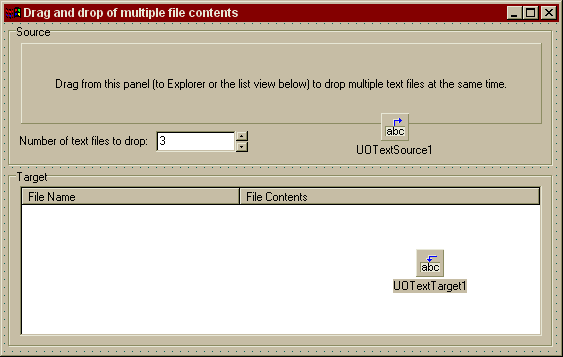
Project source
Form source (Pascal)
Form source (DFM)
| Project source: FileContentsTest2.dpr |
program FileContentsTest2;

uses
  Forms,
  fmFileContentsTest2 in 'fmFileContentsTest2.pas' {Form1};

{$R *.RES}

begin
  Application.Initialize;
  Application.CreateForm(TForm1, Form1);
  Application.Run;
end.
Back to top
|
| Form source: fmFileContentsTest2.pas |
unit fmFileContentsTest2;

{ UnitOOPS OLE Drag and Drop Components - Example
  for dropping multiple new files in Explorer or the desktop based on
  in-memory content.  Multiple-file version of FileContentsTest.dpr.

 Last modified:  03/23/2001}
interface

uses
  Windows, Messages, SysUtils, Classes, Graphics, Controls, Forms, Dialogs,
  uoole, ComCtrls, StdCtrls, ExtCtrls;

type
  TForm1 = class(TForm)
    GroupBox1: TGroupBox;
    Panel1: TPanel;
    Label1: TLabel;
    Edit1: TEdit;
    UpDown1: TUpDown;
    GroupBox2: TGroupBox;
    ListView1: TListView;
    UOTextSource1: TUOTextSource;
    UOTextTarget1: TUOTextTarget;
    procedure Panel1MouseDown(Sender: TObject; Button: TMouseButton;
      Shift: TShiftState; X, Y: Integer);
    procedure UOTextSource1RenderCustomFormat(Sender: TObject;
      const formatName: String; var formatContent: String);
    procedure UOTextTarget1Drop(Sender: TObject; Acceptor: TWinControl;
      const dropText: String; X, Y: Integer);
    procedure FormCreate(Sender: TObject);
  private
    { Private declarations }
  public
    { Public declarations }
  end;

var
  Form1: TForm1;

implementation

uses
  uoUtil, ShlObj, ActiveX;

{$R *.DFM}

function GetContentsForFileIndex(index: integer): string;
// Given a 1-based index, return something to put in the file.  We do it here
// so we can call it to get its length at a different time.  In a practical
// application, this would be the binary contents of a file, supplied on a
// string.
// Returns '1Contents for file 1'  when index = 1
//         '22Contents for file 2' when index = 2, etc.
// Testing purposes - if index is <= 0, return blank.
var
  fmtString: string;
begin
  // Uncomment to demonstrate the case where blank contents cause no file to be created
  // In this case File1.txt will never be created.  See UOTextSource1RenderCustomFormat below
  // for more information.
  //if (index = 1) then
  //begin
  //  Result := '';
  //  Exit;
  //end;

  fmtString := StringOfChar(IntToStr(index)[1], index);
  Result := Format(fmtString + 'Contents for file %d', [index]);
end;

function uoFileGroupDescriptorFromFileListEx(const rootDir: string; fileList: TStringList; sizes: array of integer): string;
// Build a FileGroupDescriptor structure in a string.  Useful for descriptive info
// about files being dragged.  Entirely optional.  If rootDir is '', the list is assumed
// to be fully qualified.  If a file doesn't exist, we look first in the Objects[] array for
// the attribute.  If it's not there, we give it the faArchive attribute.
var
  aFd: TFileDescriptor;
  aFileName: string;
  aString: string;
  j: integer;
  useSlash: boolean;
  aUINT: UINT;
begin
  result := ''; // Fall-through value

  useSlash := (rootDir <> '') and (rootDir[length(rootDir)] <> '\');
  with fileList do
  begin
    // Put the file count at the head of the FILEGROUPDESCRIPTOR structure.
    aUint := Count;
    result := uoEncodeDWORDToString(aUINT);

    // The remainder of the structure is an array of FILEDESCRIPTOR structures.
    for j := 1 to Count do    // Iterate
    begin
      if useSlash then
        aFileName := rootDir + '\' + Strings[j-1]
      else
        aFileName := rootDir + Strings[j-1];

      // Build a file descriptor for this file.
      // Bare-bones - pass only the file attributes.  We could also pass
      // file creation/mod dates, file sizes, etc, etc.
      FillChar(aFd, sizeOf(aFd), 0);
      with aFd do
      begin
        dwFlags := FD_ATTRIBUTES;
        // Do we have file sizes?
        if (high(sizes) >= Count-1) then
          dwFlags := dwFlags or FD_FILESIZE;
        // Existing file - get the attributes
        if FileExists(aFileName) then
          dwFileAttributes := FileGetAttr(aFileName)
        else
        begin
          // Non-existent file - did the user pass us attributes in Objects[]?
          dwFileAttributes := DWORD(Objects[j-1]);
          // No attributes passed - assume this is a regular file
          if (dwFileAttributes = 0) then
          begin
            dwFileAttributes := faArchive;
          end;
        end;
        strCopy(cFileName, PChar(aFileName));

        // Size
        if ((dwFlags and FD_FILESIZE) <> 0) then
        begin
          nFileSizeLow := sizes[j-1];
          nFileSizeHigh := 0; // Limit to files of size MaxInt
        end;
      end;    // with
      // Put the file descriptor on a temp string
      SetLength(aString, sizeOf(TFileDescriptor));
      System.Move(aFd, aString[1], sizeOf(TFileDescriptor));

      // And add that string to the result
      result := result + aString;
    end;    // for
  end;    // with
end;

procedure TForm1.Panel1MouseDown(Sender: TObject; Button: TMouseButton;
  Shift: TShiftState; X, Y: Integer);
var
  j: integer;
begin
  // Detect a drag
  if uoDragDetect(Panel1.Handle, POINT(X,Y), UOTextSource1.MouseButton) then
  begin
    with UOTextSource1, CustomFormatData do
    begin
      // Always clear to prevent formats accumulating between drags.
      Clear;

      // A file group descriptor, so we'll find out about the file
      // names dropped.  Use a blank string so we'll get asked for these
      // at drop-time.
      AddFormat('FileGroupDescriptor', '');

      // The file contents for each file we might be asked to fill in.  Use
      // a blank string for each so we'll get asked at drop time.
      for j := 1 to UpDown1.Max do
      begin
        AddFormatEx('FileContents', '', TYMED_HGLOBAL, j-1);
        // Make sure we don't get a trailing null.
        // Items[Count-1] is the TCustomFormatData we just added.
        Items[Count-1].AllowTrailingNull := false;
      end;

      // Finally, start the drag
      Execute;
    end;
  end;

end;

procedure TForm1.UOTextSource1RenderCustomFormat(Sender: TObject;
  const formatName: String; var formatContent: String);
// Delay render handler.  Any formats we didn't supply at drag-time will be
// requested here.  You don't have to do it this way, but it's handy for resource
// management, in the case where you need to supply a lot of formats but the
// user will be accepting only a small subset of them.
var
  aCDF: TCustomFormatData;
  aSL: TStringList;
  nFiles: integer;
  j: integer;
  sizes: array of integer;
begin
  // We get called here at drop-time to provide the
  // content for each format we didn't specify at drag-time.
  if (AnsiCompareText(formatName, 'FileGroupDescriptor') = 0) then
  begin
    // File group descriptor.  We'll pass however many file names we were asked
    // for in the UI
    nFiles := UpDown1.Position;
    SetLength(Sizes, nFiles);

    aSL := TStringList.Create;
    try
      for j := 1 to nFiles do    // Iterate
      begin
        // Get a content size from the same function that will later create the
        // content (or a shortcut, in the general case)
        sizes[j-1] := Length(GetContentsForFileIndex(j));
        // Get a file name for each.  If the content is going to be zero, blank out
        // the name, which will prevent the file being created.
        if (sizes[j-1] <> 0) then
          aSL.Add(Format('File%d.txt', [j]))
        else
          aSL.Add('');
      end;    // for

      // Use the extended function to supply sizes.
      formatContent := uoFileGroupDescriptorFromFileListEx('', aSL, sizes);
    finally
      aSL.Free;
    end;
  end;

  if (AnsiCompareText(formatName, 'FileContents') = 0) then
  begin
    // File contents.  Since we passed nFiles file names above, we'll get called
    // once for each of the nFiles indices 0..nFiles-1.
    // Get the TCustomFormatData object that was last requested
    aCDF := UOTextSource1.CustomFormatData[UOTextSource1.CustomFormatIndex];

    // Depending on the index, return the content.
    formatContent := GetContentsForFileIndex(aCDF.lIndex+1);
  end;
end;


procedure TForm1.UOTextTarget1Drop(Sender: TObject; Acceptor: TWinControl;
  const dropText: String; X, Y: Integer);
// On drop, put the file names and content into a TListView. In a real application,
// of course, you'd create the files.
var
  aString: string;
  j: integer;
  aSL: TStringList;
begin
  // Clear the list view
  ListView1.Items.Clear;

  // Get the file group descriptor information
  aString := UOTextTarget1.DataObjectGetFormat('FileGroupDescriptor');
  aSL := uoFileListFromFileGroupDescriptor(aString);

  // Now, loop over the files, looking for content
  try
    for j := 1 to aSL.Count do
    begin
      // Tell the target which index we're looking for
      DataObjectlIndex := j-1;
      // Get the content
      aString := UOTextTarget1.DataObjectGetFormat('FileContents');

      // Add a new item to the list view, and fill in the name and contents
      with ListView1.Items.Add do
      begin
        Caption := aSL[j-1];
        SubItems.Add(aString);
        //SubItems.Add(IntToStr(length(aString)));
      end;
    end;
  finally
    aSL.Free;
  end;
end;

procedure TForm1.FormCreate(Sender: TObject);
begin
  // Tell the text target we're looking for these formats
  with UOTextTarget1, CustomFormats do
  begin
    Add('FileGroupDescriptor');
    Add('FileContents');
  end;    // with
end;

end.
Back to top
|
| Form source: fmFileContentsTest2.dfm |
object Form1: TForm1
  Left = 192
  Top = 110
  BorderStyle = bsDialog
  Caption = 'Drag and drop of multiple file contents'
  ClientHeight = 330
  ClientWidth = 555
  Color = clBtnFace
  Font.Charset = DEFAULT_CHARSET
  Font.Color = clWindowText
  Font.Height = -11
  Font.Name = 'MS Sans Serif'
  Font.Style = []
  OldCreateOrder = False
  OnCreate = FormCreate
  PixelsPerInch = 96
  TextHeight = 13
  object GroupBox1: TGroupBox
    Left = 4
    Top = 2
    Width = 545
    Height = 141
    Caption = 'Source'
    TabOrder = 0
    object Label1: TLabel
      Left = 11
      Top = 109
      Width = 135
      Height = 13
      Caption = 'Number of text files to drop:  '
    end
    object Panel1: TPanel
      Left = 13
      Top = 18
      Width = 521
      Height = 81
      BorderWidth = 3
      Caption =
        'Drag from this panel (to Explorer or the list view below) to dro' +
        'p multiple text files at the same time.'
      TabOrder = 0
      OnMouseDown = Panel1MouseDown
    end
    object Edit1: TEdit
      Left = 148
      Top = 106
      Width = 80
      Height = 21
      TabOrder = 1
      Text = '3'
    end
    object UpDown1: TUpDown
      Left = 228
      Top = 106
      Width = 12
      Height = 21
      Associate = Edit1
      Min = 1
      Max = 10
      Position = 3
      TabOrder = 2
      Wrap = False
    end
  end
  object GroupBox2: TGroupBox
    Left = 4
    Top = 147
    Width = 545
    Height = 177
    Caption = 'Target'
    TabOrder = 1
    object ListView1: TListView
      Left = 12
      Top = 16
      Width = 522
      Height = 150
      Columns = <
        item
          AutoSize = True
          Caption = 'File Name'
        end
        item
          Caption = 'File Contents'
          Width = 300
        end>
      TabOrder = 0
      ViewStyle = vsReport
    end
  end
  object UOTextSource1: TUOTextSource
    OnRenderCustomFormat = UOTextSource1RenderCustomFormat
    DropEffects = [deCopy]
    MouseButton = mbLeft
    Left = 377
    Top = 90
  end
  object UOTextTarget1: TUOTextTarget
    AcceptorControl = ListView1
    AcceptTextFormats = [dtfCustom]
    OnDrop = UOTextTarget1Drop
    Left = 412
    Top = 226
  end
end
Back to top
|