Form source (Pascal)
Form source (DFM)
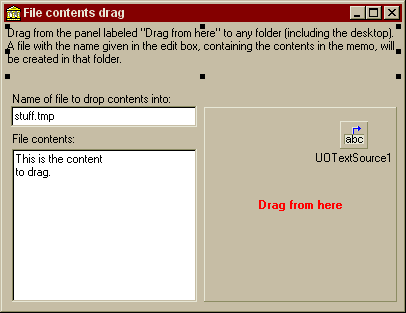
Project source
Form source (Pascal)
Form source (DFM)
| Project source: FileContentsTest.dpr |
program FileContentsTest;

uses
  Forms,
  fmFileContentsTest in 'fmFileContentsTest.pas' {Form1};

{$R *.RES}

begin
  Application.Initialize;
  Application.CreateForm(TForm1, Form1);
  Application.Run;
end.
Back to top
|
| Form source: fmFileContentsTest.pas |
unit fmFileContentsTest;

{ UnitOOPS OLE Drag and Drop Components - Example
  for dragging content into a file in Explorer.  The
  content can originate anywhere in your program.

  Last modified:  11/09/99}

interface

uses
  Windows, Messages, SysUtils, Classes, Graphics, Controls, Forms, Dialogs,
  uoole, StdCtrls, ExtCtrls;

type
  TForm1 = class(TForm)
    Panel2: TPanel;
    Label3: TLabel;
    Panel1: TPanel;
    Panel3: TPanel;
    Edit1: TEdit;
    Label1: TLabel;
    Label2: TLabel;
    Memo1: TMemo;
    UOTextSource1: TUOTextSource;
    procedure Panel1MouseDown(Sender: TObject; Button: TMouseButton;
      Shift: TShiftState; X, Y: Integer);

  private
    { Private declarations }
  public
    { Public declarations }
  end;

var
  Form1: TForm1;

implementation

uses
  uoUtil, ActiveX, ShlObj;

{$R *.DFM}


procedure TForm1.Panel1MouseDown(Sender: TObject; Button: TMouseButton;
  Shift: TShiftState; X, Y: Integer);
// The start-drag routine
var
  aSL: TStringList;
begin
  if DragDetect(Panel1.Handle, POINT(X, Y)) then
  begin
    with UOTextSource1 do
    begin
      // Make sure we have content and a file name
      if ((length(Edit1.Text)>0) and (length(Memo1.Lines.Text)>0)) then
      begin
        // Clear out the custom formats
        CustomFormatData.Clear;

        // Add the file descriptor and contents formats (since this is text
        // data, change the extension to .txt so it can be opend in the shell
        // with the .txt associated program.
        aSL := TStringList.Create;
        try
          // Add the name
          aSL.Add(ChangeFileExt(edit1.text, '.txt'));
          // Get the FGD from the list of strings and add the format
          CustomFormatData.AddFormat('FileGroupDescriptor',
            uoFileGroupDescriptorFromFileList('', aSL));
        finally
          aSL.Free;
        end;    // with

        CustomFormatData.AddFormat('FileContents', Memo1.Lines.Text);
        // Make sure no trailing nulls in FileContents, which might be a binary format
        CustomFormatData.Items[CustomFormatData.Count-1].AllowTrailingNull := false;

        // Finally execute the drag
        Execute;
      end;
    end;    // with
  end;
end;

end.
Back to top
|
| Form source: fmFileContentsTest.dfm |
object Form1: TForm1
  Left = 200
  Top = 144
  BorderStyle = bsDialog
  Caption = 'File contents drag'
  ClientHeight = 286
  ClientWidth = 398
  Color = clBtnFace
  Font.Charset = DEFAULT_CHARSET
  Font.Color = clWindowText
  Font.Height = -11
  Font.Name = 'MS Sans Serif'
  Font.Style = []
  OldCreateOrder = True
  PixelsPerInch = 96
  TextHeight = 13
  object Panel2: TPanel
    Left = 0
    Top = 0
    Width = 398
    Height = 57
    Align = alTop
    BevelOuter = bvNone
    BorderWidth = 3
    TabOrder = 0
    object Label3: TLabel
      Left = 3
      Top = 3
      Width = 392
      Height = 51
      Align = alClient
      Caption =
        'Drag from the panel labeled "Drag from here" to any folder (incl' +
        'uding the desktop).  A file with the name given in the edit box,' +
        ' containing the contents in the memo, will be created in that fo' +
        'lder.'
      WordWrap = True
    end
  end
  object Panel1: TPanel
    Left = 0
    Top = 57
    Width = 398
    Height = 229
    Align = alClient
    BevelOuter = bvNone
    TabOrder = 1
    object Label1: TLabel
      Left = 8
      Top = 12
      Width = 329
      Height = 13
      Caption =
        'Name of file to drop contents into (extension will be changed to' +
        ' .TXT):'
    end
    object Label2: TLabel
      Left = 8
      Top = 52
      Width = 63
      Height = 13
      Caption = 'File contents:'
    end
    object Panel3: TPanel
      Left = 200
      Top = 27
      Width = 193
      Height = 195
      Caption = 'Drag from here'
      Font.Charset = DEFAULT_CHARSET
      Font.Color = clRed
      Font.Height = -11
      Font.Name = 'MS Sans Serif'
      Font.Style = [fsBold]
      ParentFont = False
      TabOrder = 0
      OnMouseDown = Panel1MouseDown
    end
    object Edit1: TEdit
      Left = 7
      Top = 26
      Width = 186
      Height = 21
      TabOrder = 1
      Text = 'stuff.tmp'
    end
    object Memo1: TMemo
      Left = 8
      Top = 69
      Width = 185
      Height = 153
      Lines.Strings = (
        'This is the content'
        'to drag.')
      TabOrder = 2
    end
  end
  object UOTextSource1: TUOTextSource
    DropEffects = [deCopy]
    Left = 336
    Top = 98
  end
end
Back to top
|