Form source (Pascal)
Form source (DFM)
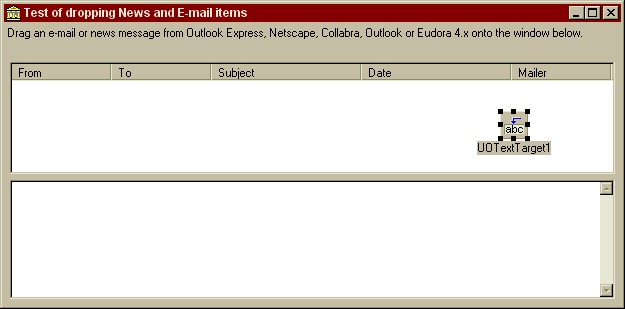
Project source
Form source (Pascal)
Form source (DFM)
| Project source: EMailTest.dpr |
program EMailTest;

{Test application for UnitOOPS OLE Drag and Drop Components}
uses
  Forms,
  fmEmailTest in 'fmEMailTest.pas' {Form1};

{$R *.RES}

begin
  Application.Initialize;
  Application.CreateForm(TForm1, Form1);
  Application.Run;
end.
Back to top
|
| Form source: fmEMailTest.pas |
unit fmEMailTest;
{Test form UnitOOPS OLE Drag and Drop Components. Demonstrates accepting drops
of e-mail messages from Microsoft Outlook Express, Netscape (4.x, 6),
Outlook (message and attachments), NeoPlanet or Eudora.
Last modified: 11/28/2000}
interface
uses
Windows, Messages, SysUtils, Classes, Graphics, Controls, Forms, Dialogs,
uoole, StdCtrls, ComCtrls, ExtCtrls;
type
TForm1 = class(TForm)
UOTextTarget1: TUOTextTarget;
Panel1: TPanel;
Label1: TLabel;
Panel2: TPanel;
Panel3: TPanel;
ListView1: TListView;
Panel4: TPanel;
Memo1: TMemo;
Panel5: TPanel;
ckbSaveOutlookAsMsg: TCheckBox;
SaveDialog1: TSaveDialog;
procedure FormCreate(Sender: TObject);
procedure UOTextTarget1Drop(Sender: TObject; Acceptor: TWinControl;
const dropText: String; X, Y: Integer);
procedure ListView1Change(Sender: TObject; Item: TListItem;
Change: TItemChange);
procedure FormDestroy(Sender: TObject);
procedure UOTextTarget1DragEnter(Sender: TObject; effect: TDropEffect;
X, Y: Integer);
private
{ Private declarations }
FSavedMsgNumber: integer;
procedure UpdateMemo;
function StripTagsFrom(const aString: string): string;
procedure ProcessMailMessage(aSL: TStringList);
public
{ Public declarations }
end;
var
Form1: TForm1;
implementation
uses
ActiveX, ComObj, ShlObj, uoNetscape, uoUtil;
resourceString
// clipboard format names for internet messages
sOutlookExpressMessage = 'Athena Mail Messages';
sOutlookExpressMessage5 = 'Outlook Express Messages';
sNetscapeMessage = 'Netscape Message';
sNetscape6Message = 'text/nsmessage';
sEudoraMessage = 'EudoraTransferClipboardFormat';
sFileGroupDescriptor = 'FileGroupDescriptor';
sFileContents = 'FileContents';
{$R *.DFM}
procedure TForm1.FormCreate(Sender: TObject);
// Set up the TUOTextTarget to accept the appropriate custom formats
begin
// Initialize
FSavedMsgNumber := 1;
with UOTextTarget1, CustomFormats do
begin
// Don't allow moves
OverrideDropEffects[deMove] := deCopy;
// Advertise that we accept these custom types
// Outlook Express
// AddObject(sOutlookExpressMessage, TObject(TYMED_HGLOBAL+TYMED_ISTREAM));
Add(sOutlookExpressMessage);
Add(sOutlookExpressMessage5);
// Netscape
Add(sNetscapeMessage);
Add(sNetscape6Message);
// Eudora
Add(sEudoraMessage);
// For Outlook, need both of the following.
// See UOTextTarget1DragEnter for how to enforce that both formats are
// present simultaneously.
Add(sFileGroupDescriptor);
AddObject(sFileContents, TObject(TYMED_ISTREAM));
// For NeoPlanet, need CF_HDROP alone
Add(IntToStr(CF_HDROP));
end; // with
end;
procedure TForm1.UpdateMemo;
// Update the memo to synchronize with the list view
var
aLi: TListItem;
begin
// Empty the memo
Memo1.Clear;
// First look for a selection
aLi := ListView1.Selected;
// If there's no selection, look for a focused item
if not assigned(aLi) then
aLi := ListView1.ItemFocused;
// If we found one, put its message body in the memo
if assigned(aLi) then
Memo1.Lines.Text := PChar(aLi.Data);
end;
function TForm1.StripTagsFrom(const aString: string): string;
// Strip HTML tags from the string passed
function StripEnclosedBy(const bString: string; const sTag: string): string;
// Strip all material enclosed by (and including) <tag>...</tag>
var
openPos, closePos: integer;
tag: string;
begin
result := bString;
tag := UpperCase(sTag);
// First, remove <TAG></TAG> tags and everything between
openPos := AnsiPos('<'+tag, UpperCase(result));
while (openPos <> 0) do
begin
closePos := AnsiPos('</'+tag, UpperCase(result));
if (closePos <> 0) then
System.Delete(result, openPos, closePos-openPos+length(tag)+3) // Delete the </TAG>
else
System.Delete(result, openPos, length(result)-openPos+1); // Malformed (no </TAG>)
openPos := AnsiPos('<'+tag+'>', UpperCase(result));
end; // while
end;
var
j, k: Integer;
inTag, onlySpaces: boolean;
s: string;
begin
result := '';
s := aString;
// Kill everything enclosed in either <script></script> or <head></head>
s := StripEnclosedBy(s, 'script');
s := StripEnclosedBy(s, 'head');
// Then, remove all other tags, LEAVING enclosed material
inTag := false;
for j := 1 to length(s) do // Iterate
begin
// Figure out if we're inside a HTML tag
if (s[j] = '<') then
inTag := true;
if inTag and (s[j] = '>') then
begin
inTag := false;
// Tag is ended. Skip to next iteration so we don't pick up '>'
continue;
end;
// If not in a tag, we do a straight copy
if not inTag then
result := result + s[j];
end; // for
// Finally, remove all multiple cr/lf combinations, i.e.
// all lines that either a) are empty or b) contain only spaces
with TStringList.Create do
try
Text := result; // Shove our string into the list
for j := count downto 1 do // Iterate
begin
// Delete any empty ones
if (Strings[j-1] = '') then
Delete(j-1)
else
begin
// Look for lines that have only spaces
onlySpaces := true;
for k := 1 to length(Strings[j-1]) do // Iterate
begin
onlySpaces := onlySpaces and (Strings[j-1][k] = ' ');
// Don't finish the loop if we found a non-space!
if not onlySpaces then break;
end; // for
if onlySpaces then
Delete(j-1);
end;
end; // for
// Put the list back onto the string.
result := Text;
finally
Free; // the string list
end; // with
end;
procedure TForm1.ProcessMailMessage(aSL: TStringList);
// We have a modified RFC822-compliant e-mail message in the string list aSL
// in the form 'To=some address', (rather than 'To: some address') etc, etc .
// Parse it and put the resulting message into our user interface.
var
aLi: TListItem;
j: integer;
spacerIndex: integer;
aPos: integer;
s: string;
body: string;
begin
// The headers end with 2 cr/lf's. That'll give a single blank string
// in the string list at that index. Find it.
spacerIndex := aSL.IndexOf('');
// Everything beyond that is the message body.
body := aSL[spacerIndex+1];
for j := spacerIndex+2 to aSL.Count-1 do // Iterate
begin
body := body + #13#10 + aSL[j];
end; // for
// Now erase the body and the spacer from the string list
// Go backwards to avoid messing up the indices.
for j := aSL.Count-1 downto spacerIndex do // Iterate
begin
aSL.Delete(j);
end; // for
// Everything that's left in the string list is header material.
for j := 0 to spacerIndex-1 do // Iterate
begin
// All headers are in the form "Header: value"
// Change all ': ' to = so we can use the names/values
// functionality of the string list
aPos := pos(': ', aSL[j]);
if (aPos <> 0) then
begin
s := aSL[j];
// Delete the ':'
System.Delete(s, aPos, 1);
// Replace the ' ' with '='
s[aPos] := '=';
// And put it back in the list in the same position
aSL[j] := s;
end;
end; // for
// If the body is HTML, do a simple-minded "remove tags" process
// We could alternatively use a HTML viewer such as the Internet
// Explorer control.
// Only look at the first part of the 'COntent-Type' string (neglecting the
// charset section)
if AnsiCompareText(Copy(aSL.Values['Content-Type'], 1, 10), 'text/html;') = 0 then
body := StripTagsFrom(body); // See function above
// Add the new item to the list view
aLi := ListView1.Items.Add;
// Populate the list item
with aLi do
begin
// The first column
Caption := aSL.Values['From'];
// The remaining columns
with SubItems do
begin
// This one may be empty. If so, first check if there's a 'Newsgroups'
// entry.
s := aSL.Values['To'];
if (s = '') then
begin
s := aSL.Values['Newsgroups'];
// If this isn't here either, then the e-mail is to the owner of the
// mailbox
if (s = '') then
s := 'Me'
end;
Add(s);
Add(aSL.Values['Subject']);
Add(aSL.Values['Date']);
// This one may be empty. Put something in, if it is.
s := aSL.Values['X-Mailer'];
if (s = '') then
s := '<unknown>';
Add(s);
end; // with
// Now, put the body of the message in the TListItem's Data property
// We allocate a new PChar, which We'll free when deleting the TListItem,
// in the form's OnDestroy handler.
Data := StrNew(PChar(body));
end; // with
// Make sure the memo is displayed
ListView1.Selected := aLi;
end;
function FindEudoraFolder(eudora: variant; const folderName: string): variant;
// Find the first Eudora folder in the Eudora application object "eudora"
// with the name contained in "folderName". There may be more than one folder
// with the same name, so this is only a 99% solution.
var
theFolder: variant;
procedure WalkFoldersIn(ParentFolder: variant);
var
j: integer;
ChildFolder: variant;
S: string;
begin
if (not varIsEmpty(theFolder)) then exit; // found already - bug out
for j := 1 to ParentFolder.Folders.Count do // Iterate
begin
ChildFolder := ParentFolder.Folders[j];
s := ChildFolder.Name;
if (AnsiCompareText(s, folderName) = 0) then
theFolder := ChildFolder;
if varIsEmpty(theFolder) and (ChildFolder.Folders.Count > 0) then
WalkFoldersIn(ChildFolder);
end;
end;
begin
// No folder yet found
theFolder := unassigned;
// Walk the folders recursively
WalkFoldersIn(eudora.rootfolder);
// Anything found is now in theFolder
result := theFolder;
end;
procedure TForm1.UOTextTarget1Drop(Sender: TObject; Acceptor: TWinControl;
const dropText: String; X, Y: Integer);
// Handle a drop of one or more e-mail messages.
// In its initial form, this method was a handler for Outlook Express messages
// only. It subsequently grew to incorporate other e-mail clients. It would
// probably benefit from being broken into several routines. However, since then
// main task is to demonstrate getting content from several different e-mail
// clients, this code rearrangement is not a high priority.
const
nSelectionsMax = 16383; // Win95 listbox limit on number of items
type
TIntegerArray = array[0..nSelectionsMax-1] of integer;
PIntegerArray = ^TIntegerArray;
var
hasOutlookFormats: boolean;
aSL: TStringList;
s, t, sURL: string;
aMS: TMemoryStream;
aHWnd: HWnd;
aIntArray: PIntegerArray;
nSelections: integer;
j: integer;
eudora: variant;
eudoraFolder: variant;
eudoraMessage: variant;
nFiles: integer;
aFd: TFileDescriptor;
anIStorage: IStorage;
bSL: TStringList;
OutlookHeaders: TStringList;
formatCount: integer;
messageFound: boolean;
W: WideString;
anIStream: IStream;
aHRes: HRESULT;
tempFileName: string;
anIndex: integer;
curAttachIndex: integer;
attachmentFileName: string;
curAttachStorageName: WideString;
aSubStorage: IStorage;
aString, tmpString: string;
begin
messageFound := false;
// Clear the memo
Memo1.Clear;
// Instantiate a string list for message processing
aSL := TStringList.Create;
try
// *****Outlook Express*****
// Is there an Outlook Express message here?
if UOTextTarget1.DataObjectHasFormat(sOutlookExpressMessage) or
UOTextTarget1.DataObjectHasFormat(sOutlookExpressMessage5) then
begin
messageFound := true;
// Get the file group descriptor as there may be multiple messages.
s := UOTextTarget1.DataObjectGetFormat(sFileGroupDescriptor);
// How many fgd's in the returned data? That's a DWORD at the head
// of the string-encoded data
nFiles := uoDecodeDWORDFromString(s);
// Make a temporary file
tempFileName := uoGetTempFileName('uox');
// Process all of the files being dragged
for j := 1 to nFiles do // Iterate
begin
// Get the j'th file descriptor. It starts after the initial DWORD,
// and has the length of a TFileDescriptor.
System.Move(s[SizeOf(DWORD)+1+(j-1)*SizeOf(TFileDescriptor)], aFd,
SizeOf(TFileDescriptor));
// Its content is on an IStream, at lindex j-1
// Global overrides for lindex and tymed
DataObjectLindex := j-1;
DataObjectTymed := TYMED_ISTREAM;
t := UOTextTarget1.DataObjectGetFormat(sFileContents);
// Watch out for nothing at that index...
if (t <> '') then
begin
// Get the IStream
DWORD(anIStream) := uoDecodeDWORDFromString(t);
// Put it on the temporary file
uoSaveIStreamToFile(anIStream, tempFileName);
// Reload into the string list
// If you want to process any attachments they can be decoded here
// since the message will be listed as multi-part MIME, etc.
aSL.LoadFromFile(tempFileName);
// Process the message to get it into the list view
ProcessMailMessage(aSL);
end; {if}
end; {for j := 1...}
aSL.Clear;
// Delete the temporary file
DeleteFile(tempFilename);
end;
// *****Netscape*****
// Netscape only gives us a mailbox:/ url - we then have to go to the
// Netscape OLE interface to get the actual message.
// We look for Netcape's message clipboard format and text together.
// Navigator 3.x supplies the former, but not the latter.
if not messageFound and
((
(UOTextTarget1.DataObjectHasFormat(sNetscapeMessage) and
UOTextTarget1.DataObjectHasFormat(IntToStr(CF_TEXT))
) or
UOTextTarget1.DataObjectHasFormat(sNetscape6Message)
))
then
begin
// Grab the (local) url for the message. This is supplied by Netscape in
// several formats. It's easiest to grab in text format.
if UOTextTarget1.DataObjectHasFormat(IntToStr(CF_TEXT)) then
sURL := UOTextTarget1.DataObjectGetFormat(IntToStr(CF_TEXT))
else
begin
tmpString := UOTextTarget1.DataObjectGetFormat(sNetscape6Message);
// The string that was returned is a wide string encoded byte-by-byte
// on an AnsiString, so we pull only the odd ones out.
// Accumulate the odd chars into a string
sURL := '';
for j := 1 to length(tmpString) do // Iterate
begin
if odd(j) then
sURL := sURL + tmpString[j];
end; // for
end;
messageFound := true;
// Now, use the Netscape OLE interface to grab the message's text
aMS := TMemoryStream.Create;
SetCursor(Screen.Cursors[crHourglass]);
try
// Put the text on the newly-created memory stream.
// Ignore the returned value, most likely 'message/rfc822'
getNetscapeURLOnStream(sURL, aMS);
// Then copy that stream to the string s
SetLength(s, aMS.size);
Move(aMS.Memory^, s[1], aMS.size);
// Finally, assign the string to our string list.
aSL.Text := s;
finally
aMS.Free;
SetCursor(Screen.Cursors[crDefault]);
end;
end;
// *****Eudora Pro 4.x*****
// ****WARNING****HERE BE DRAGONS****WARNING****
//
// Tunnel in and get the listbox that Eudora uses for e-mail
// listing display, then get the number of selections and their indices (since
// Eudora's OLE interface doesn't support the concept of selected message).
// THEN, use the OLE interface to grab the messages. (Phew)
//
// Look for both the Eudora clipboard format AND text. Text is presented also
// only when dragging from a Eudora listbox, which is precisely what we're looking
// for.
if (not messageFound) and UOTextTarget1.DataObjectHasFormat(sEudoraMessage) then
begin
if UOTextTarget1.DataObjectHasFormat(IntToStr(CF_TEXT)) then
begin
messageFound := true;
aHWnd := FindWindow('EudoraMainWindow', nil); // Main window
aHWnd := FindWindowEx(aHWnd, 0, 'MDIClient', nil); // MDI Client
aHWnd := SendMessage(aHWnd, WM_MDIGETACTIVE, 0, 0); // Active MDI child
// The title of the active MDI child window is the open mailbox window. Get it.
SetLength(s, 255);
SetLength(s, GetWindowText(aHWnd, PChar(s), 255)); // Title of active mailbox
// Now burrow further in until we get to the main listbox.
aHWnd := FindWindowEx(aHWnd, 0, 'AfxMDIFrame42', nil);
aHWnd := FindWindowEx(aHWnd, 0, '#32770', nil);
aHWnd := FindWindowEx(aHWnd, 0, 'ListBox', nil); // Handle to message list
// Now, get the selected item indices in the listbox.
// Ridiculously large (128k) allocation in case the user tries to drag
// 16383 messages. It's not a big deal these days, I guess...
GetMem(aIntArray, nSelectionsMax*sizeOf(integer));
// Going with run-time automation, so put up an hourglass in case it takes
// a while to locate the mailbox. By importing the Eudora type library and
// doing vtable automation (interfaces) this can be made much faster, probably.
SetCursor(Screen.Cursors[crHourglass]);
try
// Get the number of selections, and their (zero-based) indices, using the standard
// LB_GETSELITEMS message for multi-select list boxes.
nSelections := SendMessage(aHWnd, LB_GETSELITEMS, nSelectionsMax, integer(aIntArray));
// We now know we have nSelections selections, with indices in aIntArray^, in the
// mailbox whose name is "s". We can now use OLE automation to grab the messages.
try
// At any point in the following, an EOleSysError could occur.
try
// Construct the Eudora application object
eudora := CreateOleObject('Eudora.EuApplication.1');
// Use a helper function (see above) to find the first mailbox that's named "s"
eudoraFolder := FindEudoraFolder(eudora, s);
// Oops - we could have done it using (untested, but according to the manual)
// eudoraFolder := eudora.Folder(s, -1);
// We only get the first mailbox named "s". If it's the wrong one, then
// the indices may be wrong. Check first to avoid an exception. Passing
// here doesn't mean we've got the right one, by the way...
if ((aIntArray^[nSelections-1]) < eudoraFolder.Messages.Count) then
begin
// Iterate over the selected messages
for j := 1 to nSelections do
begin
// listbox selections are zero-based, but Eudora uses 1-based message indexing.
eudoraMessage := eudoraFolder.Messages[(aIntArray^[j-1])+1];
// Take the raw RFC822 message, and give it to the string list.
// It will get processed in ProcessMailMessage() below
aSL.Text := eudoraMessage.RawMessage;
// The raw Eudora message doesn't, however, include the date
// Include it explicitly
aSL.Insert(0, 'Date: '+eudoraMessage.Date);
// And process it
ProcessMailMessage(aSL);
// And clear out the string list for the next time around, or below.
aSL.Clear;
end; // for
end
else
begin
MessageBox(Self.Handle, PChar('The drop cannot proceed.' + #13 + #10 + #13 + #10 + 'You ' +
'probably have more than one folder named "'+s+'". This demo found only the first ' +
'one, which is obviously not the correct one, as it doesn''t have enough messages in it.'),
PChar('UnitOOPS EMailTest Demo'), MB_OK + MB_ICONERROR + MB_SETFOREGROUND);
end;
finally
// Throw away the automation object
eudoraFolder := unAssigned;
eudora := unAssigned;
end;
except
on EOleSysError do
begin
MessageBox(Self.Handle, PChar('The Eudora automation server could not be started.'
+ #13 + #10 + #13 + #10 + 'Please ' +
'ensure that you have enabled automation in Eudora (Tools | Options | Automation ' +
'and check "Automation enabled from this machine". Alternatively, stop Eudora, ' +
'and start it once with the command line "Eudora /EnableAutomation"'),
'UnitOOPS EMailTest Demo', MB_OK + MB_ICONERROR + MB_SETFOREGROUND);
end;
end;
finally
FreeMem(aIntArray, nSelectionsMax*sizeOf(integer));
SetCursor(Screen.Cursors[crDefault]);
end;
end
else
begin
// Eudora format, but no CF_TEXT.
MessageBox(Self.Handle, 'E-mail messages can only be dragged here from a Eudora list view.',
'UnitOOPS FileTest Demo', MB_OK + MB_ICONWARNING + MB_SETFOREGROUND);
end;
end;
// *****Outlook*****
// Do we have fgd?
hasOutlookFormats := (not messageFound)
and UOTextTarget1.DataObjectHasFormat(sFileGroupDescriptor);
// Global override for tymed - reset automatically by calls to
// DataObjectHasFormat and DataObjectGetFormat
DataObjectTymed := TYMED_ISTREAM;
// Do we have fc? Do the call first, so we're guaranteed that it won't
// be short-circuited, so that the global tymed and lindex get reset properly.
hasOutlookFormats := UOTextTarget1.DataObjectHasFormat(sFileContents) and hasOutlookFormats;
// We have the formats we're looking for.
if hasOutlookFormats then
begin
messageFound := true;
// Get the file group descriptors
s := UOTextTarget1.DataObjectGetFormat(sFileGroupDescriptor);
// How many fgd's in the returned data? That's a DWORD at the head
// of the string-encoded data
nFiles := uoDecodeDWORDFromString(s);
// Get the headers, too
bSL := TStringList.Create;
OutlookHeaders := nil;
try
if UOTextTarget1.DataObjectHasFormat(IntToStr(CF_TEXT)) then
begin
bSL.Text := UOTextTarget1.DataObjectGetFormat(IntToStr(CF_TEXT));
end;
// Figure out the current headers displayed in Outlook. Outlook only
// supplies, in a drop, the headers that are actually displayed.
// Also, the user may have dragged them into unusual orders.
// Here we'll get the header names and orders as currently displayed, and
// use them below to decide which header is in which position.
OutLookHeaders := uoTokenizeRaw(bSL[0], [#9]);
for j := 1 to OutLookHeaders.Count do // Iterate
begin
// Append = so we can use names/values string list functions
OutlookHeaders[j-1] := OutlookHeaders[j-1]+'=';
end; // for
// Make a temporary file
tempFileName := uoGetTempFileName('uox');
// Process all of the files being dragged
for j := 1 to nFiles do // Iterate
begin
// Get the j'th file descriptor. It starts after the initial DWORD,
// and has the length of a TFileDescriptor.
System.Move(s[SizeOf(DWORD)+1+(j-1)*SizeOf(TFileDescriptor)], aFd,
SizeOf(TFileDescriptor));
// Its content is on an IStream, at lindex j-1
// Global overrides for lindex and tymed
DataObjectLindex := j-1;
DataObjectTymed := TYMED_ISTORAGE;
t := UOTextTarget1.DataObjectGetFormat(sFileContents);
// Watch out for nothing at that index...
if (t <> '') then
begin
// Get the IStorage
DWORD(anIStorage) := uoDecodeDWORDFromString(t);
// Are we saving Outlook as MSG files? (A saved .MSG file can be double-
// clicked to start up Outlook editing that message).
// This is just an exercise in putting the IStorage on a file.
// How? Make another storage that IS a file, and copy to there!
// Because the default is direct (as opposed to transacted) mode,
// the change gets saved immediately.
if ckbSaveOutlookAsMsg.Checked then
begin
// Make sure the user sees the dialog.
SetForegroundWindow(Handle);
with SaveDialog1 do
begin
// Preset filename in save dialog
FileName := Format('Dropped Outlook Message #%d.msg', [FSavedMsgNumber]);
// Execute the save dialog
if Execute then
begin
// uoSaveIStorageToFile() introduced in V1.31
uoSaveIStorageToFile(anIStorage, SaveDialog1.FileName);
inc(FSavedMsgNumber);
end;
end; // with
end;
// ****
W := '__substg1.0_1000001E'; // Seems to be the stream name for message text
aHRes := anIStorage.OpenStream(PWideChar(w), nil,
STGM_READ or STGM_SHARE_EXCLUSIVE, 0, anIStream);
if SUCCEEDED(aHRes) then
begin
// Put the IStream contents on the file
uoSaveIStreamToFile(anIstream, tempFileName);
// Load it into a string list
aSL.LoadFromFile(tempFilename);
// Add the headers back in RFC822 format. Check for existence in the
// current Outlook view, and whether they've been rearranged.
if (bSL.Count > j) then
begin
with uoTokenizeRaw(bSL[j], [#9]) do
try
aSL.Insert(0, '');
anIndex := OutlookHeaders.IndexOfName('To');
if (anIndex >= 0) then aSL.Insert(0, 'To: '+strings[anIndex]);
anIndex := OutlookHeaders.IndexOfName('Subject');
if (anIndex >= 0) then aSL.Insert(0, 'Subject: '+strings[anIndex]);
anIndex := OutlookHeaders.IndexOfName('Received');
if (anIndex >= 0) then aSL.Insert(0, 'Date: '+strings[anIndex]);
anIndex := OutlookHeaders.IndexOfName('From');
if (anIndex >= 0) then aSL.Insert(0, 'From: '+strings[anIndex]);
finally
Free;
end; // with
end;
// Now, look for attachments.
// Initialize counter and string
curAttachIndex := 0;
aString := '';
repeat
// Form the storage name for attachment with index curAttachIndex
curAttachStorageName := Format('__attach_version1.0_#%8.8d', [curAttachIndex]);
// Now attempt to open that storage
aHRes := anIStorage.OpenStorage(PWideChar(curAttachStorageName), nil,
STGM_READ or STGM_SHARE_EXCLUSIVE, nil, 0, aSubStorage);
// If we succeed, we have a storage of that name, i.e. an attachment
if SUCCEEDED(aHRes) then
begin
// Find the file name for the attachment
W := '__substg1.0_3001001E'; // Name
// Open the stream
aSubStorage.OpenStream(PWideChar(w), nil,
STGM_READ or STGM_SHARE_EXCLUSIVE, 0, anIStream);
uoSaveIStreamToFile(anIStream, tempFileName);
with TStringList.Create do
try
LoadFromFile(tempFileName);
attachmentFileName := strings[0];
// Prepend the temp path to the file name to get a fully-
// qualified file path for saving the attachment
attachmentFileName := uoGetTempPath+attachmentFileName;
// Add attachment to list for reporting via messagebox
aString := aString + attachmentFileName + #13#10;
finally // wrap up
Free;
end; // try/finally
// Read the contents of the attachment
W := '__substg1.0_37010102'; // Contents
// Open the stream
aSubStorage.OpenStream(PWideChar(w), nil,
STGM_READ or STGM_SHARE_EXCLUSIVE, 0, anIStream);
// Save it to the file name obtained above
uoSaveIStreamToFile(anIStream, attachmentFileName);
end;
inc(curAttachIndex);
until FAILED(aHRes);
// Pop up a message if there were attachments (now saved) in the
// Outlook message currently being dropped (this messagebox could
// fire once for every message dropped).
if (curAttachIndex > 1) then
begin
aString := '%d attachment(s) were found in this Outlook message. They have '
+ 'been copied to the following locations:'#13#10#13#10
+ aString;
aString := Format(aString, [curAttachIndex-1]);
Application.MessageBox(PChar(aString), 'UnitOOPS EMailTest Demo', MB_OK + MB_ICONINFORMATION + MB_SETFOREGROUND);
end;
// Delete the temporary file
DeleteFile(tempFilename);
// And process the message
ProcessMailMessage(aSL);
end;
end;
// Clear the string list for the next go-around
aSL.Clear;
end;
finally
// Clear up temporary string lists
bSL.Free;
OutlookHeaders.Free;
end;
end;
// *****NeoPlanet*****
if (not messageFound)
and UOTextTarget1.DataObjectHasFormat(IntToStr(CF_HDROP)) then
begin
bSL := UOTextTarget1.DataObjectFormatList;
try
formatCount := bSL.Count;
finally
bSL.Free;
end;
if (formatCount = 1) then
begin
// Get the HDROP format
s := UOTextTarget1.DataObjectGetFormat(IntToStr(CF_HDROP));
// Get the list of files (one per e-mail)
bSL := uoFileListFromHDROP(s);
try
// Now iterate over these files, and pull in the messages. Each of these
// files contains a RFC822 message.
for j := 1 to bSL.Count do // Iterate
begin
aSL.LoadFromFile(bSL[j-1]);
ProcessMailMessage(aSL);
aSL.Clear;
end; // for
finally
bSL.Free;
end;
end;
end;
// Now, if aSL has any content, it has a message. Both Netscape and OE use
// RFC 822 format, so we process them in the same manner. This has already
// been called above for Outlook and Eudora, which can transfer multiple
// messages at once.
if (aSL.Count > 0) then
ProcessMailMessage(aSL);
finally
aSL.Free;
// Make sure the bottom-most item in the list view is fully visible.
ListView1.Items[ListView1.Items.Count-1].MakeVisible(false);
end;
end;
procedure TForm1.ListView1Change(Sender: TObject; Item: TListItem;
Change: TItemChange);
// The list view has changed. Make sure the memo is synchronized properly.
begin
UpdateMemo;
end;
procedure TForm1.FormDestroy(Sender: TObject);
var
j: Integer;
begin
// Clean up - delete the data element of each list item where we
// stored a message body
with ListView1 do
begin
for j := 1 to Items.Count do // Iterate
begin
if assigned(Items[j-1].Data) then
StrDispose(PChar(Items[j-1].Data));
end; // for
end; // with
end;
procedure TForm1.UOTextTarget1DragEnter(Sender: TObject;
effect: TDropEffect; X, Y: Integer);
// Ensure that, if we have FileContents, we also have FileGroupDescriptor
// (Both are needed for Outlook). This is the standard way of enforcing that
// multiple formats occur together. We only need this in OnDragEnter.
// Ensure that we don't accidentally block Netscape messages.
begin
// If we have FileGroupDescriptor, we MUST have FileContents (Outlook)
with (Sender as TUOTextTarget) do
begin
// Reset all of the drop effects to "Copy" (i.e., disallow move, link)
OverrideDropEffects[deMove] := deCopy;
OverrideDropEffects[deCopy] := deCopy;
OverrideDropEffects[deLink] := deCopy;
// Do we have fgd?
if DataObjectHasFormat(sFileGroupDescriptor) and not
DataObjectHasFormat(sNetscapeMessage) then
begin
// Global override for tymed - reset automatically by calls to
// DataObjectHasFormat and DataObjectGetFormat
DataObjectTymed := TYMED_ISTREAM;
// Do we have fc? Do the call first, so we're guaranteed that it won't
// be short-circuited, so that the global tymed and lindex get reset properly.
if not DataObjectHasFormat(sFileContents) then
begin
// We don't have both formats. All drop effects will be interpreted as
// "nothing", i.e., ignore the drop. Since we're in OnDragEnter, this
// means that a no-drop cursor is all the user will see.
OverrideDropEffects[deMove] := deNone;
OverrideDropEffects[deCopy] := deNone;
OverrideDropEffects[deLink] := deNone;
end;
end;
end;
end;
end.
Back to top
|
| Form source: fmEMailTest.dfm |
object Form1: TForm1
  Left = 210
  Top = 148
  Width = 625
  Height = 309
  Caption = 'Test of dropping News and E-mail items'
  Font.Charset = DEFAULT_CHARSET
  Font.Color = clWindowText
  Font.Height = -11
  Font.Name = 'MS Sans Serif'
  Font.Style = []
  OnCreate = FormCreate
  OnDestroy = FormDestroy
  PixelsPerInch = 96
  TextHeight = 13
  object Panel1: TPanel
    Left = 0
    Top = 0
    Width = 617
    Height = 33
    Align = alTop
    BevelOuter = bvNone
    BorderWidth = 3
    Caption = 'Panel1'
    TabOrder = 0
    object Label1: TLabel
      Left = 3
      Top = 3
      Width = 611
      Height = 27
      Align = alClient
      Caption =
        'Drag an e-mail or news message from Outlook Express, Netscape, C' +
        'ollabra, Outlook or Eudora 4.x onto the window below.'
      WordWrap = True
    end
  end
  object Panel2: TPanel
    Left = 0
    Top = 33
    Width = 617
    Height = 249
    Align = alClient
    BevelOuter = bvNone
    BorderWidth = 3
    TabOrder = 1
    object Panel3: TPanel
      Left = 3
      Top = 3
      Width = 611
      Height = 118
      Align = alTop
      BevelOuter = bvNone
      BorderWidth = 3
      Caption = 'Panel3'
      TabOrder = 0
      object ListView1: TListView
        Left = 3
        Top = 3
        Width = 605
        Height = 112
        Align = alClient
        ColumnClick = False
        Columns = <
          item
            Caption = 'From'
            Width = 100
          end
          item
            Caption = 'To'
            Width = 100
          end
          item
            Caption = 'Subject'
            Width = 150
          end
          item
            Caption = 'Date'
            Width = 150
          end
          item
            Caption = 'Mailer'
            Width = 100
          end>
        ReadOnly = True
        RowSelect = True
        OnChange = ListView1Change
        TabOrder = 0
        ViewStyle = vsReport
      end
    end
    object Panel4: TPanel
      Left = 3
      Top = 121
      Width = 611
      Height = 125
      Align = alClient
      BevelOuter = bvNone
      BorderWidth = 3
      Caption = 'Panel4'
      TabOrder = 1
      object Memo1: TMemo
        Left = 3
        Top = 3
        Width = 605
        Height = 119
        Align = alClient
        ScrollBars = ssVertical
        TabOrder = 0
      end
    end
  end
  object UOTextTarget1: TUOTextTarget
    AcceptorControl = Panel2
    AcceptTextFormats = [dtfCustom]
    OnDragEnter = UOTextTarget1DragEnter
    OnDrop = UOTextTarget1Drop
    Left = 496
    Top = 88
  end
end
Back to top
|