Form source (Pascal)
Form source (DFM)
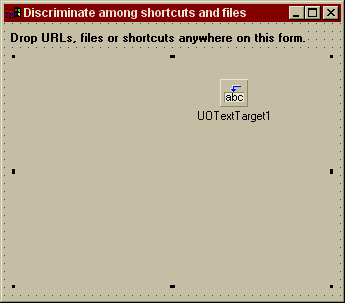
Project source
Form source (Pascal)
Form source (DFM)
| Project source: DiscriminateShortcutsTest.dpr |
program DiscriminateShortcutsTest;

// Sample application for UnitOOPS OLE Drag and Drop Components

uses
  Forms,
  fmDiscriminateShortcutsTest in 'fmDiscriminateShortcutsTest.pas' {Form1};

{$R *.RES}

begin
  Application.Initialize;
  Application.CreateForm(TForm1, Form1);
  Application.Run;
end.
Back to top
|
| Form source: fmDiscriminateShortcutsTest.pas |
unit fmDiscriminateShortcutsTest;

{ UnitOOPS OLE Drag and Drop Components - Example
  of detecting whether a drop is a file, a shortcut, a URL, etc.

 Last modified:  03/23/2001}

interface

uses
  Windows, Messages, SysUtils, Classes, Graphics, Controls, Forms, Dialogs,
  uoole, StdCtrls, ExtCtrls;

type
  TForm1 = class(TForm)
    UOTextTarget1: TUOTextTarget;
    Label2: TLabel;
    Panel1: TPanel;
    Label1: TLabel;
    procedure FormCreate(Sender: TObject);
    procedure UOTextTarget1Drop(Sender: TObject; Acceptor: TWinControl;
      const dropText: String; X, Y: Integer);
  private
    { Private declarations }
  public
    { Public declarations }
  end;

var
  Form1: TForm1;

implementation

uses
  uoUtil, iniFiles;

{$R *.DFM}

procedure TForm1.FormCreate(Sender: TObject);
begin
  with UOTextTarget1 do
  begin
    AcceptorControl := Self; // The entire form is the drop target
    OverrideDropEffects[deMove] := deCopy; // Turn all "move" into "copy"
  end;    // with
end;

procedure TForm1.UOTextTarget1Drop(Sender: TObject; Acceptor: TWinControl;
  const dropText: String; X, Y: Integer);
var
  shortCut: string;
  url: string;
  fileName: string;
begin
  // We've been dropped on. We'll assume only one file or shortcut is dropped.
  // It should be clear how you'd extend to more than one.

  url := '';  // placeholder string for pretty printing.  It will contain 'URL' or ''.

  with UOTextTarget1 do
  begin
    begin
      case DroppedTextFormat of

        // URL dropped (e.g. from IE address bar)
        dtfURL:  Label1.Caption := Format('Dropped URL: URL=%s, title=%s',
          [droppedLines[0], URLTitle]);

        // File dropped.  Could be a shell shortcut, a URL shortcut, or (gasp) a file
        dtfFiles:  begin
          // Let's see if it's a shortcut of some kind
          // See uoUtil, which has a lot of useful stuff in it.
          fileName := droppedLines[0];
          // Attempt to resolve a shell shortcut
          shortCut := uoGetShortcutPath(fileName);
          if (shortCut = '') then
          begin
            // It wasn't a shell shortcut.  It could still be a URL shortcut
            if (AnsiCompareText(ExtractFileExt(fileName), '.url') = 0) then
            begin
              // IE .url files are special ini files.
              with TIniFile.Create(fileName) do
              begin
                try
                  shortCut := ReadString('InternetShortcut', 'URL', '');
                  // If it has the right section, it's a URL shortcut, otherwise
                  // it'll fall through looking like a file.
                  if (shortCut <> '') then
                    url := 'URL';
                finally
                  Free;
                end;    // with
              end;
            end;
          end;

          // If shortCut is still blank, the drop was just a plain old file
          if (shortCut = '') then
          begin
            Label1.Caption := Format('Dropped file:  %s', [fileName]);
          end
          else
          begin
            // Remove the path and the extension to make the title look the way it
            // does in the shell.
            Label1.Caption := Format('Dropped %s shortcut: location=%s, title=%s, command=%s',
              [url, fileName, ChangeFileExt(ExtractFileName(fileName), ''), shortCut]);
          end;
        end;

      end;
    end;
  end;  // with

end;

end.
Back to top
|
| Form source: fmDiscriminateShortcutsTest.dfm |
object Form1: TForm1
  Left = 192
  Top = 147
  BorderStyle = bsDialog
  Caption = 'Discriminate among shortcuts and files'
  ClientHeight = 276
  ClientWidth = 337
  Color = clBtnFace
  Font.Charset = DEFAULT_CHARSET
  Font.Color = clWindowText
  Font.Height = -11
  Font.Name = 'MS Sans Serif'
  Font.Style = []
  OldCreateOrder = False
  OnCreate = FormCreate
  PixelsPerInch = 96
  TextHeight = 13
  object Label2: TLabel
    Left = 6
    Top = 8
    Width = 297
    Height = 13
    Caption = 'Drop URLs, files or shortcuts anywhere on this form.'
    Font.Charset = DEFAULT_CHARSET
    Font.Color = clWindowText
    Font.Height = -11
    Font.Name = 'MS Sans Serif'
    Font.Style = [fsBold]
    ParentFont = False
  end
  object Panel1: TPanel
    Left = 8
    Top = 32
    Width = 321
    Height = 233
    BevelOuter = bvNone
    TabOrder = 0
    object Label1: TLabel
      Left = 0
      Top = 0
      Width = 321
      Height = 233
      Align = alClient
      WordWrap = True
    end
  end
  object UOTextTarget1: TUOTextTarget
    AcceptTextFormats = [dtfURL, dtfFiles]
    OnDrop = UOTextTarget1Drop
    Left = 216
    Top = 56
  end
end
Back to top
|