Form source (Pascal)
Form source (DFM)
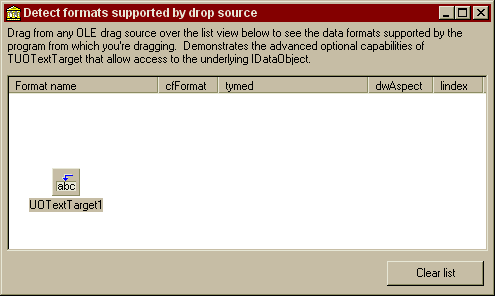
Project source
Form source (Pascal)
Form source (DFM)
| Project source: CustomTest3.dpr |
program customTest3;
{Main program file for test application for UnitOOPS OLE Drag and Drop Components.}
uses
  Forms,
  fmFormatViewer in 'fmFormatViewer.pas' {Form1};

{$R *.RES}

begin
  Application.Initialize;
  Application.CreateForm(TForm1, Form1);
  Application.Run;
end.
Back to top
|
| Form source: fmFormatViewer.pas |
unit fmFormatViewer;

{ UnitOOPS OLE Drag and Drop Components - Example
  for detecting the formats available from a drop source.

 Last modified:  09/04/98}
interface

uses
  Windows, Messages, SysUtils, Classes, Graphics, Controls, Forms, Dialogs,
  ComCtrls, StdCtrls, ExtCtrls, uoole;

type
  TForm1 = class(TForm)
    Panel1: TPanel;
    Label1: TLabel;
    Panel2: TPanel;
    ListView1: TListView;
    UOTextTarget1: TUOTextTarget;
    Panel3: TPanel;
    Panel4: TPanel;
    Button1: TButton;
    procedure UOTextTarget1DragEnter(Sender: TObject; effect: TDropEffect;
      X, Y: Integer);
    procedure Button1Click(Sender: TObject);
  private
    { Private declarations }
  public
    { Public declarations }
  end;

var
  Form1: TForm1;

implementation

{$R *.DFM}

procedure TForm1.UOTextTarget1DragEnter(Sender: TObject;
  effect: TDropEffect; X, Y: Integer);
// A drag and drop operation has entered our target (the list view).
// Clear the list view, and fill it with the formats available for
// dragging.
var
  aSL, tmpSL: TStringList;
  j: Integer;
begin
  ListView1.Items.BeginUpdate; // Efficiency
  ListView1.Items.Clear; // Clear the list

  // Get the data object to give up its list of data
  aSL := (Sender as TUOTextTarget).DataObjectFormatEtcList;
  tmpSL := TStringList.Create;
  try
    for j := 1 to aSL.Count do    // Iterate over the list
    begin
      tmpSL.CommaText := aSL[j-1];

      with ListView1.Items.Add do
      begin
        Caption := tmpSL[0]; // Caption is format name
        tmpSL.Delete(0); // Now remove the first one
        SubItems.AddStrings(tmpSL); // And add the rest to the subitems.
      end;    // with
    end;    // for

  finally
    // Clean up
    aSL.Free;
    tmpSL.Free;
  end;


  ListView1.Items.EndUpdate; // Efficiency
end;

procedure TForm1.Button1Click(Sender: TObject);
// Clear the list
begin
  with ListView1.Items do
  begin
    BeginUpdate;
    Clear;
    EndUpdate;
  end;
end;

end.
Back to top
|
| Form source: fmFormatViewer.dfm |
object Form1: TForm1
  Left = 115
  Top = 191
  Width = 495
  Height = 296
  Caption = 'Detect formats supported by drop source'
  Font.Charset = DEFAULT_CHARSET
  Font.Color = clWindowText
  Font.Height = -11
  Font.Name = 'MS Sans Serif'
  Font.Style = []
  PixelsPerInch = 96
  TextHeight = 13
  object Panel1: TPanel
    Left = 0
    Top = 0
    Width = 487
    Height = 49
    Align = alTop
    BevelOuter = bvNone
    BorderWidth = 3
    TabOrder = 0
    object Label1: TLabel
      Left = 3
      Top = 3
      Width = 481
      Height = 43
      Align = alClient
      Caption =
        'Drag from any OLE drag source over the list view below to see th' +
        'e data formats supported by the program from which you'#39're draggi' +
        'ng.  Demonstrates the advanced optional capabilities of TUOTextT' +
        'arget that allow access to the underlying IDataObject. '
      WordWrap = True
    end
  end
  object Panel2: TPanel
    Left = 0
    Top = 49
    Width = 487
    Height = 182
    Align = alClient
    BevelOuter = bvNone
    BorderWidth = 3
    TabOrder = 1
    object ListView1: TListView
      Left = 3
      Top = 3
      Width = 481
      Height = 176
      Align = alClient
      ColumnClick = False
      Columns = <
        item
          Caption = 'Format name'
          Width = 150
        end
        item
          Caption = 'cfFormat'
          Width = 60
        end
        item
          Caption = 'tymed'
          Width = 150
        end
        item
          Caption = 'dwAspect'
          Width = 65
        end
        item
          Caption = 'lindex'
        end>
      TabOrder = 0
      ViewStyle = vsReport
    end
  end
  object Panel3: TPanel
    Left = 0
    Top = 231
    Width = 487
    Height = 38
    Align = alBottom
    BevelOuter = bvNone
    TabOrder = 2
    object Panel4: TPanel
      Left = 375
      Top = 0
      Width = 112
      Height = 38
      Align = alRight
      BevelOuter = bvNone
      TabOrder = 0
      object Button1: TButton
        Left = 8
        Top = 7
        Width = 97
        Height = 25
        Caption = 'Clear list'
        TabOrder = 0
        OnClick = Button1Click
      end
    end
  end
  object UOTextTarget1: TUOTextTarget
    AcceptorControl = ListView1
    AcceptTextFormats = []
    OnDragEnter = UOTextTarget1DragEnter
    Left = 48
    Top = 145
  end
end
Back to top
|