Form source (Pascal)
Form source (DFM)
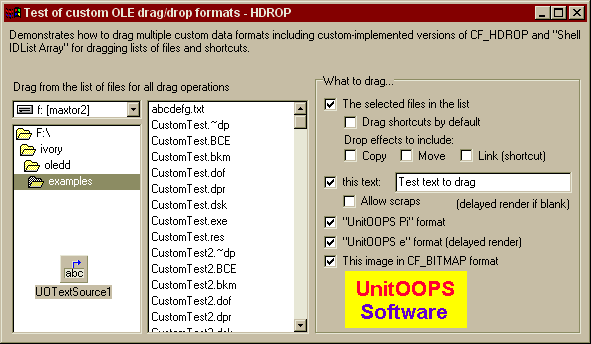
Project source
Form source (Pascal)
Form source (DFM)
| Project source: CustomTest2.dpr |
program CustomTest2;
{Main program file for test application for UnitOOPS OLE Drag and Drop Components.}
uses
  Forms,
  fmCustomHDROP in 'fmCustomHDROP.pas' {Form1};

{$R *.RES}

begin
  Application.Initialize;
  Application.CreateForm(TForm1, Form1);
  Application.Run;
end.
Back to top
|
| Form source: fmCustomHDROP.pas |
unit fmCustomHDROP;

{ UnitOOPS OLE Drag and Drop Components - Example
  for dragging data in multiple custom (user-defined) formats.

 Last modified:  09/26/2000}

interface

uses
  Windows, Messages, SysUtils, Classes, Graphics, Controls, Forms, Dialogs,
  FileCtrl, StdCtrls, ExtCtrls, uoole, uoUtil;

type
  TForm1 = class(TForm)
    Panel1: TPanel;
    DriveComboBox1: TDriveComboBox;
    FileListBox1: TFileListBox;
    DirectoryListBox1: TDirectoryListBox;
    UOTextSource1: TUOTextSource;
    Panel2: TPanel;
    Label1: TLabel;
    Label2: TLabel;
    GroupBox1: TGroupBox;
    CheckBox1: TCheckBox;
    Edit1: TEdit;
    CheckBox2: TCheckBox;
    CheckBox3: TCheckBox;
    Label3: TLabel;
    Image1: TImage;
    CheckBox4: TCheckBox;
    CheckBox5: TCheckBox;
    CheckBox6: TCheckBox;
    CheckBox7: TCheckBox;
    CheckBox8: TCheckBox;
    CheckBox9: TCheckBox;
    CheckBox10: TCheckBox;
    Label4: TLabel;
    procedure CheckBox1Click(Sender: TObject);
    procedure UOTextSource1BeforeDrop(Sender: TObject; Donor: TComponent;
      var dropText: String; var cancelDrop: Boolean);
    procedure UOTextSource1RenderCustomFormat(Sender: TObject;
      const formatName: String; var formatContent: String);
    procedure CheckBox5Click(Sender: TObject);
    procedure UOTextSource1AfterDrop(Sender: TObject; Donor: TComponent;
      droppedOK: Boolean);
    procedure FormCreate(Sender: TObject);
    procedure FileListBox1MouseDown(Sender: TObject; Button: TMouseButton;
      Shift: TShiftState; X, Y: Integer);
  private
    { Private declarations }
    FTempFileName: string;

    function GetSelectedFileList: TStringList;
    function HDropFromSelectedFiles: string;
    function ShellIDListFromSelectedFiles: string;
    function FileGroupDescriptorFromSelectedFiles: string;
  public
    { Public declarations }
  end;

var
  Form1: TForm1;

implementation

uses
  ActiveX, ShlObj, uoPIDL;

{$R *.DFM}

function TForm1.FileGroupDescriptorFromSelectedFiles: string;
// Build the FileGroupDescriptor format.
var
  aSL: TStringList;
begin
  result := ''; // Fall-through value

  // Get the selected items into aSL.
  aSL := GetSelectedFileList;
  try
    // Now, build the FGD structure using the uoUtil function uoFileGroupDescriptorFromFileList
    // See Win32 help for details of the structure, which we just render onto a string
    result := uoFileGroupDescriptorFromFileList(DirectoryListBox1.Directory, aSL);
  finally
    aSL.Free;
  end;
end;

function TForm1.HDROPFromSelectedFiles: string;
// Build the HDROP format to allow dragging files.
var
  aSL: TStringList;
begin
  result := ''; // Fall-through value

  // Get the selected items into aSL.
  aSL := GetSelectedFileList;
  try
    // Now, build the HDROP structure using the uoUtil function uoHDROPFromFileList
    // See Win32 help for details of the structure, which we just render onto a string
    result := uoHDROPFromFileList(DirectoryListBox1.Directory, aSL);
  finally
    aSL.Free;
  end;
end;


function TForm1.ShellIDListFromSelectedFiles: string;
// Build the Shell ID List to allow dragging shortcuts.  Works in association
// with the CF_HDROP format.
var
  aSL: TStringList;
begin
  result := ''; // Fall-through value

  // Get the selected items into aSL.
  aSL := GetSelectedFileList;
  try
    // Now, build the ShellIDList using the uoUtil function uoShellIDListFromFileList
    // See Win32 help for details of the structure, which we just render onto a string
    result := uoShellIDListFromFileList(DirectoryListBox1.Directory, aSL);
  finally
    aSL.Free;
  end;
end;

function TForm1.GetSelectedFileList: TStringList;
// Put the list of currently selected files (names only, not full paths) in
// a TStringList, and pass it back.  Caller must free.
var
  j: Integer;
begin
  result := TStringList.create;

  with FileListBox1, Items do
  begin
    for j := 1 to Count do    // Iterate
    begin
      if Selected[j-1] then
        result.Add(Strings[j-1]);
    end;    // for
  end;    // with

end;

procedure TForm1.CheckBox1Click(Sender: TObject);
begin
  Edit1.Enabled := CheckBox1.Checked;
  CheckBox7.Enabled := CheckBox1.Checked;
end;

procedure TForm1.UOTextSource1BeforeDrop(Sender: TObject;
  Donor: TComponent; var dropText: String; var cancelDrop: Boolean);
begin
  // Since we've defined custom formats, dropText is meaningless here
  // However, we could still cancel the drop using cancelDrop, if we
  // wanted, or modify the CustomFormatData list.
end;

procedure TForm1.UOTextSource1RenderCustomFormat(Sender: TObject;
  const formatName: String; var formatContent: String);
begin
  // Render formats that weren't rendered before executing the
  // TUOTextSource
  if (AnsiCompareText(IntToStr(CF_TEXT), formatName) = 0) then
    formatContent := 'Here is your custom-rendered string data!';

  if (AnsiCompareText('UnitOOPS e', formatName) = 0) then
    formatContent := uoEncodeDoubleToString(exp(1));
end;

procedure TForm1.CheckBox5Click(Sender: TObject);
begin
  CheckBox6.Enabled := CheckBox5.Checked;
  CheckBox8.Enabled := CheckBox5.Checked;
  CheckBox9.Enabled := CheckBox5.Checked;
  CheckBox10.Enabled := CheckBox5.Checked;
end;

procedure TForm1.UOTextSource1AfterDrop(Sender: TObject; Donor: TComponent;
  droppedOK: Boolean);
begin
  // If we created a temporary file for scrap drops, delete it here.
  if ((FTempFileName <> '') and FileExists(FTempFileName)) then
  begin
    DeleteFile(FTempFileName);
    FTempFileName := '';
  end;

end;

procedure TForm1.FormCreate(Sender: TObject);
begin
  // At startup, make the drop effects checkboxes reflect the TUOTextSource
  // published properties set at design-time.
  CheckBox8.Checked := (deCopy in UOTextSource1.DropEffects);
  CheckBox9.Checked := (deMove in UOTextSource1.DropEffects);
  CheckBox10.Checked := (deLink in UOTextSource1.DropEffects);
end;

procedure TForm1.FileListBox1MouseDown(Sender: TObject;
  Button: TMouseButton; Shift: TShiftState; X, Y: Integer);
var
  aString: string;
  aHBitmap: HBitmap;
  aDe: TDropEffects;
begin
  if DragDetect(FileListBox1.Handle, POINT(X,Y)) then
  begin
    // Start with a clean slate of formats
    UOTextSource1.CustomFormatData.Clear;

    // Clear the temp file name
    FTempFileName := '';

    // Get set to drag files
    if CheckBox5.Checked then
    begin
      // Get the drop effects dynamically from the checkboxes.
      aDe := [];
      if CheckBox8.Checked then
        Include(aDe, deCopy)
      else
        Exclude(aDe, deCopy);
      if CheckBox9.Checked then
        Include(aDe, deMove)
      else
        Exclude(aDe, deMove);
      if CheckBox10.Checked then
        Include(aDe, deLink)
      else
        Exclude(aDe, deLink);
      UOTextSource1.DropEffects := aDe;

      // Drag the "Shell IDList Array" format to get file linking capabilities
      // Needs CF_HDROP (=15, see below) to be present too for move/copy
      UOTextSource1.CustomFormatData.addFormat('Shell IDList Array', ShellIDListFromSelectedFiles);

      // Set "Preferred DropEffect" format to deLink, to avoid the Move/Copy/Create shortcut
      // menu when the drop effect chosen is "Link".  In Win95 (original) you get the menu
      // anyway.  Works in cooperation with "Shell IDList Arrray".
      if CheckBox6.Checked then
        UOTextSource1.CustomFormatData.addFormat('Preferred DropEffect',
          uoEncodeDWORDToString(DropEffectFromEnum(deLink)));

      // Drag FileGroupDescriptor
      UOTextSource1.CustomFormatData.addFormat('FileGroupDescriptor',
        FileGroupDescriptorFromSelectedFiles);
      // Drag the CF_HDROP (=15) format to get file copying and moving.
      UOTextSource1.CustomFormatData.addFormat('15', HDropFromSelectedFiles);
    end;

    // Add CF_TEXT (1) for testing.  This has the same effect in a custom
    // format as just setting UOTextSource1.Text = Edit1.Text when not
    // using custom data formats.  This one will be rendered on demand
    // (the first time only) if Edit1.Text is blank.
    if CheckBox1.Checked then
    begin
      UOTextSource1.Customformatdata.addFormat(IntToStr(CF_TEXT), Edit1.Text);

      if CheckBox7.Checked then
      begin
        // Add FileName format to get scraps properly when dragging to the desktop.
        // The file name specified must be valid.  We create a temp file for this,
        // and delete it in the OnAfterDrop event.
        with TStringList.create do
        try
          add(Edit1.Text);
          FTempFileName := uoGetTempFileName('uox');
          // Give it the right extension, so we can open the scrap using the
          // associated program when it's double-clicked
          RenameFile(FTempFileName, ChangeFileExt(FTempFileName, '.txt'));
          FTempFileName := ChangeFileExt(FTempFileName, '.txt');
          SaveToFile(FTempFileName);
        finally
          free;
        end;    // with
        UOTextSource1.CustomFormatData.addFormat('FileName', FTempFileName);
      end;
    end;

    // Test bitmap on GDI handle.  This is an example of how a TUOTextSource with
    // custom data formats can be equivalent to a TUOGraphicSource!  Of course,
    // for best color results, you should transfer CF_DIB rather than CF_BITMAP.
    if CheckBox4.Checked then
    begin
      // We just put the bitmap handle itself on the string.  The component will
      // take care of copying it at the appropriate point.
      aHBitmap := Image1.Picture.Bitmap.Handle;
      aString := uoEncodeDWORDToString(aHBitmap);

      // The TYMED is passed in the objects[] array.  If there's no entry
      // for a given custom format, the components assume TYMED_HGLOBAL
      // which is the usual format.
      UOTextSource1.CustomFormatData.AddFormatEx(IntToStr(CF_BITMAP), aString, TYMED_GDI, -1);
    end;

    // Finally, add two custom formats
    // This one is the geometric constant Pi
    if CheckBox2.Checked then
      UOTextSource1.CustomFormatData.addFormat('UnitOOPS Pi', uoEncodeDoubleToString(3.141592654));

    // This one will be rendered on demand (the first time only), since its content
    // is blank.  See UOTextSource1RenderCustomFormat below - it will be used to
    // transfer the base of the natural logarithms, e.
    if CheckBox3.Checked then
      UOTextSource1.CustomFormatData.addFormat('UnitOOPS e', '');

    // Our drag source now knows how to supply several different standard data formats,
    // text and file lists) as well as our custom formats ('Unitoops Pi','UnitOOPS e')
    // that deliver "Pi" and "e" as doubles (test this using CustomTest1.DPR, with the
    // target format set to 'UnitOOPS Pi' and 'UnitOOPS e', respectively.
    UOTextSource1.Execute;
  end;
end;

end.
Back to top
|
| Form source: fmCustomHDROP.dfm |
object Form1: TForm1
  Left = 216
  Top = 139
  BorderStyle = bsDialog
  Caption = 'Test of custom OLE drag/drop formats - HDROP'
  ClientHeight = 317
  ClientWidth = 583
  Font.Charset = DEFAULT_CHARSET
  Font.Color = clWindowText
  Font.Height = -11
  Font.Name = 'MS Sans Serif'
  Font.Style = []
  OnCreate = FormCreate
  PixelsPerInch = 96
  TextHeight = 13
  object Panel1: TPanel
    Left = 0
    Top = 48
    Width = 577
    Height = 265
    BevelOuter = bvNone
    TabOrder = 0
    object Label2: TLabel
      Left = 9
      Top = 9
      Width = 216
      Height = 13
      Caption = 'Drag from the list of files for all drag operations'
    end
    object DriveComboBox1: TDriveComboBox
      Left = 8
      Top = 29
      Width = 130
      Height = 19
      DirList = DirectoryListBox1
      TabOrder = 0
    end
    object FileListBox1: TFileListBox
      Left = 143
      Top = 29
      Width = 162
      Height = 234
      DragMode = dmAutomatic
      ItemHeight = 16
      MultiSelect = True
      TabOrder = 1
      OnStartDrag = FileListBox1StartDrag
    end
    object DirectoryListBox1: TDirectoryListBox
      Left = 8
      Top = 53
      Width = 130
      Height = 210
      FileList = FileListBox1
      ItemHeight = 16
      TabOrder = 2
    end
    object GroupBox1: TGroupBox
      Left = 311
      Top = 3
      Width = 266
      Height = 260
      Caption = 'What to drag...'
      TabOrder = 3
      object Label3: TLabel
        Left = 141
        Top = 123
        Width = 113
        Height = 13
        Alignment = taRightJustify
        Caption = '(delayed render if blank)'
      end
      object Image1: TImage
        Left = 30
        Top = 197
        Width = 122
        Height = 57
        AutoSize = True
        Picture.Data = {
          07544269746D6170D21F0000424DD21F00000000000036040000280000007A00
          ...truncated for brevity...
          D2D2D2D2D2D2D2D2D2D2D2D2D2D2D2D2D2D2D2D2D2D2D2D2D2D2D2D20000}
      end
      object Label4: TLabel
        Left = 29
        Top = 59
        Width = 110
        Height = 13
        Caption = 'Drop effects to include:'
      end
      object CheckBox1: TCheckBox
        Left = 9
        Top = 100
        Width = 65
        Height = 17
        Caption = 'this text:'
        State = cbChecked
        TabOrder = 0
        OnClick = CheckBox1Click
      end
      object Edit1: TEdit
        Left = 80
        Top = 98
        Width = 177
        Height = 21
        TabOrder = 1
        Text = 'Test text to drag'
      end
      object CheckBox2: TCheckBox
        Left = 9
        Top = 140
        Width = 201
        Height = 17
        Caption = '"UnitOOPS Pi" format'
        State = cbChecked
        TabOrder = 2
      end
      object CheckBox3: TCheckBox
        Left = 9
        Top = 160
        Width = 207
        Height = 17
        Caption = '"UnitOOPS e" format (delayed render)'
        State = cbChecked
        TabOrder = 3
      end
      object CheckBox4: TCheckBox
        Left = 9
        Top = 179
        Width = 200
        Height = 17
        Caption = 'This image in CF_BITMAP format'
        State = cbChecked
        TabOrder = 4
      end
      object CheckBox5: TCheckBox
        Left = 9
        Top = 22
        Width = 232
        Height = 17
        Caption = 'The selected files in the list'
        State = cbChecked
        TabOrder = 5
        OnClick = CheckBox5Click
      end
      object CheckBox6: TCheckBox
        Left = 29
        Top = 40
        Width = 220
        Height = 17
        Caption = 'Drag shortcuts by default'
        TabOrder = 6
      end
      object CheckBox7: TCheckBox
        Left = 28
        Top = 119
        Width = 97
        Height = 17
        Caption = 'Allow scraps'
        TabOrder = 7
      end
      object CheckBox8: TCheckBox
        Left = 29
        Top = 74
        Width = 51
        Height = 16
        Caption = 'Copy'
        TabOrder = 8
      end
      object CheckBox9: TCheckBox
        Left = 85
        Top = 74
        Width = 51
        Height = 16
        Caption = 'Move'
        TabOrder = 9
      end
      object CheckBox10: TCheckBox
        Left = 145
        Top = 74
        Width = 104
        Height = 16
        Caption = 'Link (shortcut)'
        TabOrder = 10
      end
    end
  end
  object Panel2: TPanel
    Left = 0
    Top = 0
    Width = 583
    Height = 49
    Align = alTop
    BevelOuter = bvNone
    BorderWidth = 5
    TabOrder = 1
    object Label1: TLabel
      Left = 5
      Top = 5
      Width = 573
      Height = 39
      Align = alClient
      Caption =
        'Demonstrates how to drag multiple custom data formats including ' +
        'custom-implemented versions of CF_HDROP and "Shell IDList Array"' +
        ' for dragging lists of files and shortcuts.'
      WordWrap = True
    end
  end
  object UOTextSource1: TUOTextSource
    OnBeforeDrop = UOTextSource1BeforeDrop
    OnAfterDrop = UOTextSource1AfterDrop
    OnRenderCustomFormat = UOTextSource1RenderCustomFormat
    Text = 'Default text'
    DropEffects = [deCopy, deMove, deLink]
    Left = 56
    Top = 232
  end
end
Back to top
|