Form source (Pascal)
Form source (DFM)
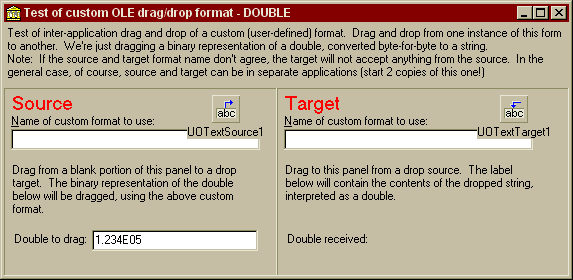
Project source
Form source (Pascal)
Form source (DFM)
| Project source: customtest.dpr |
program CustomTest;
{Main program file for test application for UnitOOPS OLE Drag and Drop Components.}
uses
  Forms,
  fmCustomFormat in 'fmCustomFormat.pas' {Form1};

{$R *.RES}

begin
  Application.Initialize;
  Application.CreateForm(TForm1, Form1);
  Application.Run;
end.
Back to top
|
| Form source: fmCustomFormat.pas |
unit fmCustomFormat;

{ UnitOOPS OLE Drag and Drop Components - Example
  for dragging and dropping data in a custom (user-defined) format.
  Assumes the data are in a string

 Last modified:  09/29/99}
interface

uses
  Windows, Messages, SysUtils, Classes, Graphics, Controls, Forms, Dialogs,
  StdCtrls, uoole, uoutil, ExtCtrls;

type
  TForm1 = class(TForm)
    Panel1: TPanel;
    Label1: TLabel;
    UOTextSource1: TUOTextSource;
    UOTextTarget1: TUOTextTarget;
    Panel2: TPanel;
    Panel3: TPanel;
    Edit1: TEdit;
    Label2: TLabel;
    Label3: TLabel;
    Label4: TLabel;
    Label5: TLabel;
    Label6: TLabel;
    Edit2: TEdit;
    Label7: TLabel;
    Label8: TLabel;
    Edit3: TEdit;
    Label9: TLabel;
    Label10: TLabel;
    Label11: TLabel;
    procedure UOTextTarget1Drop(Sender: TObject; Acceptor: TWinControl;
      const dropText: String; X, Y: Integer);
    procedure Edit2Change(Sender: TObject);
    procedure Panel2MouseDown(Sender: TObject; Button: TMouseButton;
      Shift: TShiftState; X, Y: Integer);
  private
    { Private declarations }
  public
    { Public declarations }
  end;

var
  Form1: TForm1;

implementation

{$R *.DFM}


procedure TForm1.UOTextTarget1Drop(Sender: TObject; Acceptor: TWinControl;
  const dropText: String; X, Y: Integer);
// Data has been dropped on us.  In this case, we already know it's the only
// format we accept.
var
  aDouble: double;
begin
  aDouble := uoDecodeDoubleFromString(dropText);

  // And give it to the control.
  Label10.Caption := FloatToStr(aDouble);
end;

procedure TForm1.Edit2Change(Sender: TObject);
// Pick up changes in the target format name
begin
  begin
    with UOTextTarget1.CustomFormats do
    begin
      // Clear the current list of accepted formats
      clear;

      // And add the name in Edit2
      add(Edit2.Text);
    end;
  end;
end;

procedure TForm1.Panel2MouseDown(Sender: TObject; Button: TMouseButton;
  Shift: TShiftState; X, Y: Integer);
var
  aDouble: double;
begin
  if DragDetect(Panel2.Handle, POINT(X,Y)) then
  begin
    // Encode the double to be dragged into a string
    // First, get the double from the edit.
    try
      aDouble := StrToFloat(Edit3.Text);
    except
      on EConvertError do
        aDouble := 3.141592654;  // Use Pi for a bad number - it's recognizable!
    end;

    with UOTextSource1.CustomFormatData do
    begin
      // First clear the format data...
      clear;
      // ...then encode the double as a string and give it to the text source in
      // a format with the name given by Edit1.Text <phew...!>
      addFormat(Edit1.Text, uoEncodeDoubleToString(aDouble));
    end;

    UOTextSource1.Execute; // Start the OLE drag
  end;

end;

end.
Back to top
|
| Form source: fmCustomFormat.dfm |
object Form1: TForm1
  Left = 242
  Top = 278
  Width = 573
  Height = 280
  Caption = 'Test of custom OLE drag/drop format - DOUBLE'
  Font.Charset = DEFAULT_CHARSET
  Font.Color = clWindowText
  Font.Height = -11
  Font.Name = 'MS Sans Serif'
  Font.Style = []
  PixelsPerInch = 96
  TextHeight = 13
  object Panel1: TPanel
    Left = 0
    Top = 0
    Width = 565
    Height = 65
    Align = alTop
    BevelOuter = bvNone
    BorderWidth = 3
    TabOrder = 0
    object Label1: TLabel
      Left = 3
      Top = 3
      Width = 559
      Height = 26
      Align = alTop
      Caption =
        'Test of inter-application drag and drop of a custom (user-define' +
        'd) format.  Drag and drop from one instance of this form to anot' +
        'her.  We'#39're just dragging a binary representation of a double, c' +
        'onverted byte-for-byte to a string. '
      WordWrap = True
    end
    object Label11: TLabel
      Left = 3
      Top = 29
      Width = 559
      Height = 26
      Align = alTop
      Caption =
        'Note:  If the source and target format name don'#39't agree, the tar' +
        'get will not accept anything from the source.  In the general ca' +
        'se, of course, source and target can be in separate applications' +
        ' (start 2 copies of this one!)'
      WordWrap = True
    end
  end
  object Panel2: TPanel
    Left = 0
    Top = 65
    Width = 273
    Height = 188
    Align = alLeft
    BevelOuter = bvLowered
    DragMode = dmAutomatic
    TabOrder = 1
    OnStartDrag = Panel2StartDrag
    object Label2: TLabel
      Left = 7
      Top = 26
      Width = 144
      Height = 13
      Caption = '&Name of custom format to use:'
      FocusControl = Edit1
    end
    object Label3: TLabel
      Left = 8
      Top = 75
      Width = 249
      Height = 57
      AutoSize = False
      Caption =
        'Drag from a blank portion of this panel to a drop target.  The b' +
        'inary representation of the double below will be dragged, using ' +
        'the above custom format.'
      WordWrap = True
    end
    object Label4: TLabel
      Left = 8
      Top = 3
      Width = 61
      Height = 24
      Caption = 'Source'
      Font.Charset = DEFAULT_CHARSET
      Font.Color = clRed
      Font.Height = -19
      Font.Name = 'MS Sans Serif'
      Font.Style = []
      ParentFont = False
    end
    object Label8: TLabel
      Left = 10
      Top = 144
      Width = 76
      Height = 13
      Caption = 'Double to drag: '
    end
    object Edit1: TEdit
      Left = 7
      Top = 41
      Width = 249
      Height = 21
      TabOrder = 0
    end
    object Edit3: TEdit
      Left = 88
      Top = 142
      Width = 166
      Height = 21
      TabOrder = 1
      Text = '1.234E05'
    end
  end
  object Panel3: TPanel
    Left = 273
    Top = 65
    Width = 292
    Height = 188
    Align = alClient
    BevelOuter = bvLowered
    TabOrder = 2
    object Label5: TLabel
      Left = 8
      Top = 3
      Width = 54
      Height = 24
      Caption = 'Target'
      Font.Charset = DEFAULT_CHARSET
      Font.Color = clRed
      Font.Height = -19
      Font.Name = 'MS Sans Serif'
      Font.Style = []
      ParentFont = False
    end
    object Label6: TLabel
      Left = 7
      Top = 26
      Width = 144
      Height = 13
      Caption = '&Name of custom format to use:'
      FocusControl = Edit2
    end
    object Label7: TLabel
      Left = 8
      Top = 75
      Width = 249
      Height = 57
      AutoSize = False
      Caption =
        'Drag to this panel from a drop source.  The label below will con' +
        'tain the contents of the dropped string, interpreted as a double' +
        '.'
      WordWrap = True
    end
    object Label9: TLabel
      Left = 10
      Top = 144
      Width = 84
      Height = 13
      Caption = 'Double received: '
    end
    object Label10: TLabel
      Left = 104
      Top = 144
      Width = 5
      Height = 13
      Font.Charset = DEFAULT_CHARSET
      Font.Color = clBlue
      Font.Height = -11
      Font.Name = 'MS Sans Serif'
      Font.Style = [fsBold]
      ParentFont = False
    end
    object Edit2: TEdit
      Left = 7
      Top = 41
      Width = 249
      Height = 21
      TabOrder = 0
      OnChange = Edit2Change
    end
  end
  object UOTextSource1: TUOTextSource
    DropEffects = [deCopy]
    Left = 208
    Top = 72
  end
  object UOTextTarget1: TUOTextTarget
    AcceptorControl = Panel3
    AcceptTextFormats = [dtfCustom]
    OnDrop = UOTextTarget1Drop
    Left = 496
    Top = 72
  end
end
Back to top
|