Form source (Pascal)
Form source (DFM)
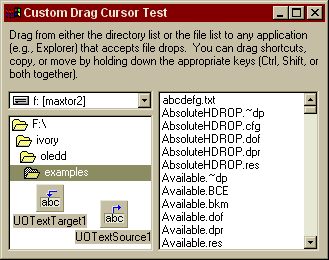
Project source
Form source (Pascal)
Form source (DFM)
| Project source: CursorTest2.dpr |
program cursortest2;

uses
  Forms,
  fmCursorTest2 in 'fmCursorTest2.pas' {Form1};

{$R *.RES}

begin
  Application.Initialize;
  Application.CreateForm(TForm1, Form1);
  Application.Run;
end.
Back to top
|
| Form source: fnCursorTest2.pas |
unit fmCursorTest2;

{ UnitOOPS OLE Drag and Drop Components - Example  2
  for using custom cursors for feedback during a drag operation.

 Last modified:  11/02/98}

interface

uses
  Windows, Messages, SysUtils, Classes, Graphics, Controls, Forms, Dialogs,
  FileCtrl, StdCtrls, uoole, ExtCtrls, rzcsintf;

type
  TForm1 = class(TForm)
    UOTextSource1: TUOTextSource;
    UOTextTarget1: TUOTextTarget;
    Panel1: TPanel;
    Panel2: TPanel;
    DriveComboBox1: TDriveComboBox;
    DirectoryListBox1: TDirectoryListBox;
    FileListBox1: TFileListBox;
    Label1: TLabel;
    procedure UOTextSource1GiveFeedback(Sender: TObject;
      effect: TDropEffect; var defCursors: Boolean);
    procedure FormCreate(Sender: TObject);
    procedure FormDestroy(Sender: TObject);
    procedure FileListBox1MouseDown(Sender: TObject; Button: TMouseButton;
      Shift: TShiftState; X, Y: Integer);
    procedure UOTextSource1AfterDrop(Sender: TObject; Donor: TComponent;
      droppedOK: Boolean);
    procedure UOTextSource1CancelDrop(Sender: TObject);
  private
    { Private declarations }

    // dragIcons: array[TDropEffect] of TIcon;
    ilDrag: TImageList;
    currentEffectIndex: integer;
    procedure InitializeDragCursors(isFile: boolean);
    procedure FreeDragCursors;
  public
    { Public declarations }
  end;

var
  Form1: TForm1;

implementation

uses
  ShellAPI, uoUtil;

{$R *.DFM}
{$R olecursors.res}

const
  crOLENo = 1;
  crOLECopy = 2;
  crOLEMove = 3;
  crOLELink = 4;

const
  iHeight = 75;
  iHd2 = iHeight div 2;
  iWidth = 500;

procedure TForm1.UOTextSource1GiveFeedback(Sender: TObject;
  effect: TDropEffect; var defCursors: Boolean);
// Give feedback.  This is where we substitute our imagelist drag images
// for the standard cursors. iHD2 is iHeight div 2, which is the y-position
// of the cursor hotspot. We get called here every time the mouse moves or a
// drop effect modifier key is pressed (e.g., Ctrl, Shift).
var
  aPt: TPoint;
begin
  defCursors := false; // We're going to paint our own cursors.

  if not defCursors then
  begin
    GetCursorPos(aPt);  // Where are we?
    // If the drop effect has changed, we'll change images
    if (currentEffectIndex <> ord(effect)) then
    begin
      // Store the new drop effect index.
      currentEffectIndex := ord(effect);

      // Stop dragging
      ilDrag.EndDrag;
      // Set the new drag image to the correct index based on the
      // current drop effect.
      ilDrag.SetDragImage(ord(effect), 0, 0);
      // Begin dragging with the new one.  The windows to specify is the
      // desktop window, since we could be dragging anywhere on the screen.
      // If you want to restrict this further, then only do it within the
      // bounds of a given window, and set defCursors = true otherwise.
      ilDrag.BeginDrag(GetDesktopWindow, aPt.X, aPt.Y-iHd2);
    end;
    // Either way, we'll move the image (may or may not have changed).
    ilDrag.DragMove(aPt.X, aPt.Y-iHd2);
  end;
end;

procedure TForm1.FreeDragCursors;
// Clean up the drag image list, and reset the effect index
begin
  if Assigned(ilDrag) then
    ilDrag.Free;

  CurrentEffectIndex := -1;

end;

procedure TForm1.InitializeDragCursors(isFile: boolean);
// Each time we start a drag, we'll call this function.  It constructs
// a set of images and puts them in an image list (masked by clOlive).
// The alternative to this sort of approach is to use standard Windows
// cursors and calls to "SetCursor" within TUOTextSource.OnGiveFeedback.
// In Win95, however, this limits you to standard (32x32) cursors sizes,
// although you can get bigger ones in WinNT (see CursorTest.dpr).
var
  aBMP: TBitmap;
  aDe: TDropEffect;
  aShFI: TShFileInfo;
  dragString: string;
begin
  // For each operation, we'll just use the filename as the text
  if isFile then
    dragString := Filelistbox1.Filename
  else
    dragString := DirectoryListBox1.Directory;

  // Get the small icon for the file being dragged
  fillChar(aShfi, sizeOf(aShfi), 0);
  SHGetFileInfo(PChar(dragString), 0, aShFI, sizeOf(aShFI),
    SHGFI_ICON or SHGFI_SMALLICON);

  // Clear out the icons
  FreeDragCursors;

  // Make an image list to hold the drag images
  ilDrag := TImageList.Create(nil);

  // Make the size of each individual image large to accomodate long text.
  // We're only using half, since the hotspot is in the middle.
  ilDrag.Height := iHeight;
  ilDrag.Width := iWidth;
  // Make the temporary bitmap onto whose handle we'll draw the content that
  // will become the cursors.
  aBMP := TBitmap.Create;
  try
    aBMP.width := iWidth;
    aBMP.height := iHeight;
    with aBMP.Canvas, aBMP do
    begin
      // Loop over all drop effects (except scroll)
      for aDe := low(TDropEffect) to pred(high(TDropEffect)) do
      begin
        // Choose font settings
        // Use text in red for "no drop" case
        if aDe = deNone then
          Font.Color := clRed
        else
          Font.Color := clWindowText;

        // Fill the background with solid olive, the color we use as mask
        // This effectively "clears" the background, since the mask color
        // will be gone when we turn this into a cursor.
        Brush.Color := clOlive;
        Brush.Style := bsSolid;
        FillRect(Rect(0, 0, width, height));

        // Draw the appropriate cursor.
        // Here, we've loaded some custom
        // cursors from olecursors.res (just the standard OLE cursors, taken
        // from OLE32.DLL using Resource Workshop).  Their hotspots are all
        // at (0, 0).
        // See the FormCreate method above for more information.
        DrawIcon(aBMP.Canvas.Handle, 0, height div 2,
          Screen.Cursors[crOLENo + ord(aDe)]);

        // Draw the small file icon.
        // Use DrawIconEx rather than DrawIcon, since the latter appears to
        // insist on drawing even a small icon by stretching to the default
        // icon metrics.
        DrawIconEx(aBMP.Canvas.Handle, 16 ,
          (height - GetSystemMetrics(SM_CYSMICON)) div 2,
          aShfi.hIcon, 0, 0, 0, 0, DI_NORMAL);

        // Draw the text string, on a clear background
        // Here we just draw the file name.  We align it to the
        // icon, already drawn.
        Brush.Style := bsClear;
        TextOut(20 + GetSystemMetrics(SM_CXSMICON),
          (height - abs(Font.Height)) div 2, dragString);

        // Here's the action part of the procedure.  Add the image to the
        // image list using clOlive as the mask.
        ilDrag.AddMasked(aBMP, clOlive);
      end;
    end;
  finally
    aBMP.Free;
  end;
end;

procedure TForm1.FormCreate(Sender: TObject);
begin
  // Load the custom cursors defined on olecursurs.res.
  // They're actually just the standard OLE cursors from OLE32.DLL
  Screen.Cursors[crOLENo] := LoadCursor(HInstance, 'CURNO');
  Screen.Cursors[crOLECopy] := LoadCursor(HInstance, 'CURCOPY');
  Screen.Cursors[crOLEMove] := LoadCursor(HInstance, 'CURMOVE');
  Screen.Cursors[crOLELink] := LoadCursor(HInstance, 'CURLINK');

  // Drawing efficiency and flicker-minimization.
  currentEffectIndex := -1;

  // Trickery.  If the form isn't itself an OLE drop target, we'll get the
  // standard "no drop" cursor, rather than our custom one.  To get our custom
  // "no drop" cursor, we set up a dummy text target with the form as its
  // AcceptorControl, but that accepts no formats!
  UOTextTarget1.AcceptTextFormats := [];
  UOTextTarget1.AcceptorControl := Self;
end;

procedure TForm1.FormDestroy(Sender: TObject);
begin
  // Clean up.
  FreeDragCursors;
end;

procedure TForm1.FileListBox1MouseDown(Sender: TObject;
  Button: TMouseButton; Shift: TShiftState; X, Y: Integer);
// This is shared by FileListBox1 and DirectoryListBox1.
// On mouse down, detect a drag.
var
  aSL: TStringList;
begin
  // Probably the best way to start a drag.  No cursor changes happen
  // until you leave the drag rect.
  if DragDetect(Handle, ClientToScreen(POINT(X, Y))) then
  begin
    // Set up the drag cursors based on the current selection
    InitializeDragCursors(Sender = FileListBox1);
    // Do the drag
    with UOTextSource1 do
    begin
      Text := '';  // Don't pass any text.  We're only passing custom formats.
      // Functions below expect a TStringList - make one.
      aSL := TStringList.Create;
      if (Sender = FileListBox1) then
        aSL.add(FileListBox1.FileName)
      else
        aSL.add(DirectoryListBox1.Directory);
      try
        CustomFormatData.Clear;
        // Pass file copy, move, link information
        CustomFormatData.AddFormat(IntToStr(CF_HDROP),
          uoHDropFromFileList('', aSL));
        CustomFormatData.AddFormat('Shell IDList Array',
          uoShellIDListFromFileList('', aSL));
      finally
        aSL.Free;
      end;
      Execute;  // Start the drag operation
    end;
  end;
end;

procedure TForm1.UOTextSource1AfterDrop(Sender: TObject; Donor: TComponent;
  droppedOK: Boolean);
begin
  // Tell the image list we're done dragging
  ilDrag.EndDrag;
end;

procedure TForm1.UOTextSource1CancelDrop(Sender: TObject);
begin
  // Tell the image list we're done dragging
  ilDrag.EndDrag;
end;

end.
Back to top
|
| Form source: fmCursorTest2.dfm |
object Form1: TForm1
  Left = 312
  Top = 196
  BorderStyle = bsDialog
  Caption = 'Custom Drag Cursor Test'
  ClientHeight = 233
  ClientWidth = 321
  Color = clBtnFace
  Font.Charset = DEFAULT_CHARSET
  Font.Color = clWindowText
  Font.Height = -11
  Font.Name = 'MS Sans Serif'
  Font.Style = []
  OldCreateOrder = False
  OnCreate = FormCreate
  OnDestroy = FormDestroy
  PixelsPerInch = 96
  TextHeight = 13
  object Panel1: TPanel
    Left = 0
    Top = 0
    Width = 321
    Height = 65
    Align = alTop
    BevelOuter = bvNone
    BorderWidth = 5
    TabOrder = 0
    object Label1: TLabel
      Left = 5
      Top = 5
      Width = 311
      Height = 55
      Align = alClient
      Caption =
        'Drag from either the directory list or the file list to any appl' +
        'ication (e.g., Explorer) that accepts file drops.  You can drag ' +
        'shortcuts, copy, or move by holding down the appropriate keys (C' +
        'trl, Shift, or both together).  '
      WordWrap = True
    end
  end
  object Panel2: TPanel
    Left = 0
    Top = 65
    Width = 321
    Height = 168
    Align = alClient
    BevelOuter = bvNone
    TabOrder = 1
    object DriveComboBox1: TDriveComboBox
      Left = 4
      Top = 3
      Width = 145
      Height = 19
      DirList = DirectoryListBox1
      TabOrder = 0
    end
    object DirectoryListBox1: TDirectoryListBox
      Left = 4
      Top = 27
      Width = 145
      Height = 136
      FileList = FileListBox1
      ItemHeight = 16
      TabOrder = 1
      OnMouseDown = FileListBox1MouseDown
    end
    object FileListBox1: TFileListBox
      Left = 154
      Top = 3
      Width = 161
      Height = 160
      ItemHeight = 13
      TabOrder = 2
      OnMouseDown = FileListBox1MouseDown
    end
  end
  object UOTextSource1: TUOTextSource
    OnGiveFeedback = UOTextSource1GiveFeedback
    DropEffects = [deCopy, deMove, deLink]
    Left = 96
    Top = 177
  end
  object UOTextTarget1: TUOTextTarget
    AcceptTextFormats = []
    Left = 32
    Top = 161
  end
end
Back to top
|