Form source (Pascal)
Form source (DFM)
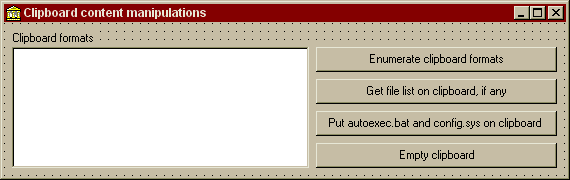
Project source
Form source (Pascal)
Form source (DFM)
| Project source: ClipboardTest.dpr |
program ClipboardTest;

{Example application for UnitOOPS OLE Drag and Drop Components}

uses
  Forms,
  fmClipboardTest in 'fmClipboardTest.pas' {Form1};

{$R *.RES}

begin
  Application.Initialize;
  Application.CreateForm(TForm1, Form1);
  Application.Run;
end.
Back to top
|
| Form source: fmClipboardTest.pas |
unit fmClipboardTest;

{Demonstrates using the uoUtil clipboard format helper functions to manipulate
 actual clipboard data rather than drag-and-drop data.

 Last modified:  12/13/98}

interface

uses
  Windows, Messages, SysUtils, Classes, Graphics, Controls, Forms, Dialogs,
  StdCtrls;

type
  TForm1 = class(TForm)
    ListBox1: TListBox;
    btnEnumClipboard: TButton;
    btnCFHDROP: TButton;
    btnPutClipboard: TButton;
    btnEmptyClipboard: TButton;
    Label1: TLabel;
    procedure btnEnumClipboardClick(Sender: TObject);
    procedure btnCFHDROPClick(Sender: TObject);
    procedure btnPutClipboardClick(Sender: TObject);
    procedure btnEmptyClipboardClick(Sender: TObject);
  private
    { Private declarations }
  public
    { Public declarations }
  end;

var
  Form1: TForm1;

implementation

uses
  ClipBrd, uoUtil;

{$R *.DFM}

procedure TForm1.btnEnumClipboardClick(Sender: TObject);
// Fill the list box with the name of every format currently available
// on the clipboard
var
  aFmt: DWORD;
  j: Integer;
begin
  ListBox1.Clear;

  for j := 1 to Clipboard.FormatCount do    // Iterate
  begin
    aFmt := Clipboard.Formats[j-1];
    ListBox1.Items.Add(ClipboardFormatDisplayname(aFmt));
  end;    // for

  Label1.Caption := 'Clipboard formats';
end;

procedure TForm1.btnCFHDROPClick(Sender: TObject);
// Get the list of files, if any, available on the clipboard
// You'd use this, e.g., to do a paste operation for files.
var
  aSL: TStringList;
  S: string;
begin
  ClipBoard.Open;
  try
    s := uoGetHandleDataToString(Clipboard.GetAsHandle(CF_HDROP));
    aSL := uoFileListFromHDROP(s);
    // Now we have the file list.  We could paste these, or make shortcuts.
    // Here we just put the names into a listbox.
    try
      ListBox1.Clear;
      ListBox1.Items.AddStrings(aSL);
    finally
      aSL.Free;
    end;
  finally
    Clipboard.Close;
  end;

  Label1.Caption := 'List of files on clipboard';
end;

procedure TForm1.btnPutClipboardClick(Sender: TObject);
// Put a list of files on the clipboard for pasting or pasting as shortcut
var
  aSL: TStringList;
  s, t: string;
begin
  aSL := TStringList.create;
  try
    // Put two file names in the list
    aSL.Add('c:\autoexec.bat');
    asl.add('c:\config.sys');
    // Generate both CF_HDROP and Shell IDList Array formats
    s := uoHDropFromFileList('', aSL);
    t := uoShellIDListFromFileList('', aSL);
  finally
    aSL.Free;
  end;

  // Put the formats on the clipboard
  Clipboard.Open;
  try
    // CF_DROP, so we can paste files
    Clipboard.SetAsHandle(CF_HDROP,
      uoSetHandleDataFromString(s));
    // Shell IDList Array, so we can paste shortcuts also
    Clipboard.SetAsHandle(ClipboardFormatFromString('Shell IDList Array'),
      uoSetHandleDataFromString(t));
  finally
    Clipboard.Close;
  end;
end;

procedure TForm1.btnEmptyClipboardClick(Sender: TObject);
// Clear the clipboard
begin
  ClipBoard.Clear;

  ListBox1.Clear;
  Label1.Caption := 'Clipboard formats';
end;

end.
Back to top
|
| Form source: fmClipboardTest.dfm |
object Form1: TForm1
  Left = 200
  Top = 127
  BorderStyle = bsDialog
  Caption = 'Clipboard content manipulations'
  ClientHeight = 153
  ClientWidth = 562
  Font.Charset = DEFAULT_CHARSET
  Font.Color = clWindowText
  Font.Height = -11
  Font.Name = 'MS Sans Serif'
  Font.Style = []
  PixelsPerInch = 96
  TextHeight = 13
  object Label1: TLabel
    Left = 8
    Top = 8
    Width = 81
    Height = 13
    Caption = 'Clipboard formats'
  end
  object ListBox1: TListBox
    Left = 8
    Top = 24
    Width = 297
    Height = 121
    ItemHeight = 13
    TabOrder = 0
  end
  object btnEnumClipboard: TButton
    Left = 312
    Top = 24
    Width = 241
    Height = 25
    Caption = 'Enumerate clipboard formats'
    TabOrder = 1
    OnClick = btnEnumClipboardClick
  end
  object btnCFHDROP: TButton
    Left = 312
    Top = 56
    Width = 241
    Height = 25
    Caption = 'Get file list on clipboard, if any'
    TabOrder = 2
    OnClick = btnCFHDROPClick
  end
  object btnPutClipboard: TButton
    Left = 312
    Top = 88
    Width = 241
    Height = 25
    Caption = 'Put autoexec.bat and config.sys on clipboard '
    TabOrder = 3
    OnClick = btnPutClipboardClick
  end
  object btnEmptyClipboard: TButton
    Left = 312
    Top = 120
    Width = 241
    Height = 25
    Caption = 'Empty clipboard'
    TabOrder = 4
    OnClick = btnEmptyClipboardClick
  end
end
Back to top
|