Form source (Pascal)
Form source (DFM)
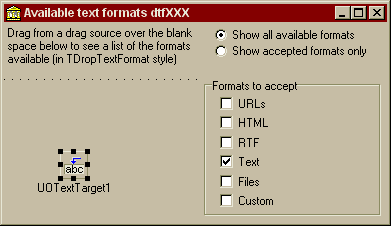
Project source
Form source (Pascal)
Form source (DFM)
| Project source: Available.dpr |
program Available;
{Main program file for test application for UnitOOPS OLE Drag and Drop Components.}
uses
  Forms,
  fmAvailable in 'fmAvailable.pas' {Form1};

{$R *.RES}

begin
  Application.Initialize;
  Application.CreateForm(TForm1, Form1);
  Application.Run;
end.
Back to top
|
| Form source: fmAvailable.pas |
unit fmAvailable;
{Test form for drag-and-drop between applications using the UnitOOPS OLE Drag
 and Drop Components.

 Demonstrates detecting available formats using TUOTextTarget.AvailableTextFormats.
 There is also a corresponding TUOGraphicTarget.AvailableGraphicFormats.

 Last modified: 09/23/98}
interface

uses
  Windows, Messages, SysUtils, Classes, Graphics, Controls, Forms, Dialogs,
  uoole, ExtCtrls, StdCtrls;

type
  TForm1 = class(TForm)
    Panel1: TPanel;
    UOTextTarget1: TUOTextTarget;
    Panel2: TPanel;
    Label1: TLabel;
    RadioButton1: TRadioButton;
    RadioButton2: TRadioButton;
    Label2: TLabel;
    GroupBox1: TGroupBox;
    CheckBox1: TCheckBox;
    CheckBox2: TCheckBox;
    CheckBox3: TCheckBox;
    CheckBox4: TCheckBox;
    CheckBox5: TCheckBox;
    CheckBox6: TCheckBox;
    procedure UOTextTarget1DragOver(Sender: TObject; effect: TDropEffect;
      X, Y: Integer);
    procedure FormCreate(Sender: TObject);
    procedure CheckBox1Click(Sender: TObject);
  private
    { Private declarations }
    ckbFmts: array[0..5] of TCheckBox;

    procedure UpdateAcceptTextFormats;
  public
    { Public declarations }
  end;

var
  Form1: TForm1;

implementation

uses
  typInfo;

{$R *.DFM}

procedure TForm1.UOTextTarget1DragOver(Sender: TObject;
  effect: TDropEffect; X, Y: Integer);
var
  aDTfs: TDropTextFormats;
  S: string;
  j: TDropTextFormat;
begin
  // Get the text formats available in the data object being dragged.
  // This is the important part!
  aDTfs := UOTextTarget1.AvailableTextFormats;

  // If required, take the intersection with the acceptable formats
  if RadioButton2.Checked then
  begin
    aDTfs := aDTfs*UOTextTarget1.AcceptTextFormats;
    Label2.Font.Color := clRed;
  end
  else
    Label2.Font.Color := clWindowText;

  // Generate a text representation of the format set
  s :=  '[';
  for j := low(TDropTextFormat) to high(TDropTextFormat) do    // Iterate
  begin
    if j in aDTfs then
      s := s + GetEnumName(TypeInfo(TDropTextFormat), integer(j)) + ', ';
  end;    // for
  if (s[length(s)] = ' ')  then   // Remove trailing comma
    delete(s, length(s)-1, 2);
  s := s + ']'; // terminate the string

  // Give the text representation to the label
  Label2.Caption := s;
end;

procedure TForm1.FormCreate(Sender: TObject);
var
  j: integer;
begin
  for j := 1 to 6 do    // Iterate
  begin
    ckbFmts[j-1] := TCheckBox(FindComponent(Format('CheckBox%d', [j])));
  end;    // for

  // Set AcceptTextFormats based on the checkboxes
  UpdateAcceptTextFormats;
end;

procedure TForm1.UpdateAcceptTextFormats;
// Rebuild the AcceptTextFormats property of the TUOTextTarget based
// on the format checkboxes.
var
  aDTfs: TDropTextFormats;
  j: integer;
begin
  aDtfs := [];

  for j := 0 to 5 do    // Iterate
  begin
    if ckbFmts[j].Checked then
      Include(aDTfs, TDropTextFormat(j));
  end;    // for

  UOTextTarget1.AcceptTextFormats := aDTfs;
end;

procedure TForm1.CheckBox1Click(Sender: TObject);
// Shared handler for all 6 format checkboxes
begin
  UpdateAcceptTextFormats;
end;

end.
Back to top
|
| Form source: fmAvailable.dfm |
object Form1: TForm1
  Left = 137
  Top = 180
  BorderStyle = bsDialog
  Caption = 'Available text formats dtfXXX'
  ClientHeight = 199
  ClientWidth = 383
  Font.Charset = DEFAULT_CHARSET
  Font.Color = clWindowText
  Font.Height = -11
  Font.Name = 'MS Sans Serif'
  Font.Style = []
  OnCreate = FormCreate
  PixelsPerInch = 96
  TextHeight = 13
  object Panel1: TPanel
    Left = 0
    Top = 57
    Width = 193
    Height = 138
    BevelOuter = bvNone
    BorderWidth = 3
    TabOrder = 0
    object Label2: TLabel
      Left = 3
      Top = 3
      Width = 187
      Height = 132
      Align = alClient
      WordWrap = True
    end
  end
  object Panel2: TPanel
    Left = 0
    Top = 0
    Width = 383
    Height = 49
    Align = alTop
    BevelOuter = bvNone
    BorderWidth = 3
    TabOrder = 1
    object Label1: TLabel
      Left = 3
      Top = 3
      Width = 198
      Height = 43
      Align = alLeft
      Caption =
        'Drag from a drag source over the blank space below to see a list' +
        ' of the formats available (in TDropTextFormat style)'
      WordWrap = True
    end
    object RadioButton1: TRadioButton
      Left = 210
      Top = 4
      Width = 167
      Height = 17
      Caption = 'Show all available formats'
      Checked = True
      TabOrder = 0
      TabStop = True
    end
    object RadioButton2: TRadioButton
      Left = 210
      Top = 20
      Width = 167
      Height = 17
      Caption = 'Show accepted formats only'
      TabOrder = 1
    end
  end
  object GroupBox1: TGroupBox
    Left = 200
    Top = 56
    Width = 177
    Height = 137
    Caption = 'Formats to accept'
    TabOrder = 2
    object CheckBox1: TCheckBox
      Left = 16
      Top = 17
      Width = 97
      Height = 16
      Caption = 'URLs'
      TabOrder = 0
      OnClick = CheckBox1Click
    end
    object CheckBox2: TCheckBox
      Left = 16
      Top = 36
      Width = 97
      Height = 16
      Caption = 'HTML'
      TabOrder = 1
      OnClick = CheckBox1Click
    end
    object CheckBox3: TCheckBox
      Left = 16
      Top = 56
      Width = 97
      Height = 16
      Caption = 'RTF'
      TabOrder = 2
      OnClick = CheckBox1Click
    end
    object CheckBox4: TCheckBox
      Left = 16
      Top = 75
      Width = 97
      Height = 16
      Caption = 'Text'
      State = cbChecked
      TabOrder = 3
      OnClick = CheckBox1Click
    end
    object CheckBox5: TCheckBox
      Left = 16
      Top = 95
      Width = 97
      Height = 16
      Caption = 'Files'
      TabOrder = 4
      OnClick = CheckBox1Click
    end
    object CheckBox6: TCheckBox
      Left = 16
      Top = 114
      Width = 97
      Height = 16
      Caption = 'Custom'
      TabOrder = 5
      OnClick = CheckBox1Click
    end
  end
  object UOTextTarget1: TUOTextTarget
    AcceptorControl = Panel1
    AcceptTextFormats = [dtfText]
    OnDragOver = UOTextTarget1DragOver
    Left = 56
    Top = 128
  end
end
Back to top
|